
Trust until review, also trusts the grant for a fixed period. Every change is kept in a per-grant audit history.
What reviewing adds
Classifying a grant by scope, origin, and trust tells you what the grant is. Reviewing records what your team has decided about it and who is accountable, so the set of grants stays understood as it changes.Keep, Remove, and Review later are records only: they change nothing about a grant’s classification or its findings. Trust until review is different. It opens a time-boxed trust window that makes the grant Trusted until the review date you set.
Review fields
Each grant carries four review fields.
All four are optional, and every field can be changed at any time. Each change is recorded in the grant’s review history.
Two decisions interact with Next review:
Review laterfills in a date three months out if you have not set one.Trust until reviewrequires a date. See Setting the trust window.
Finding the grants that need attention
Three controls narrow the inventory to review work:- The
Past duepreset above the table shows grants whose next-review date has passed. Grants with no review date set are not included. - The Decision filter selects grants by recorded decision. Grants with no decision are not returned, so it cannot be used to find unreviewed grants.
- The Next review filter takes a From and a To date. Grants with no review date set are not returned.
There is no filter for the
Needs re-review state. Those grants are Untrusted, so they appear under the Untrusted external preset. To list them exactly, export the table and filter the export on the column recording why a trust window lapsed.Reviewing in the table
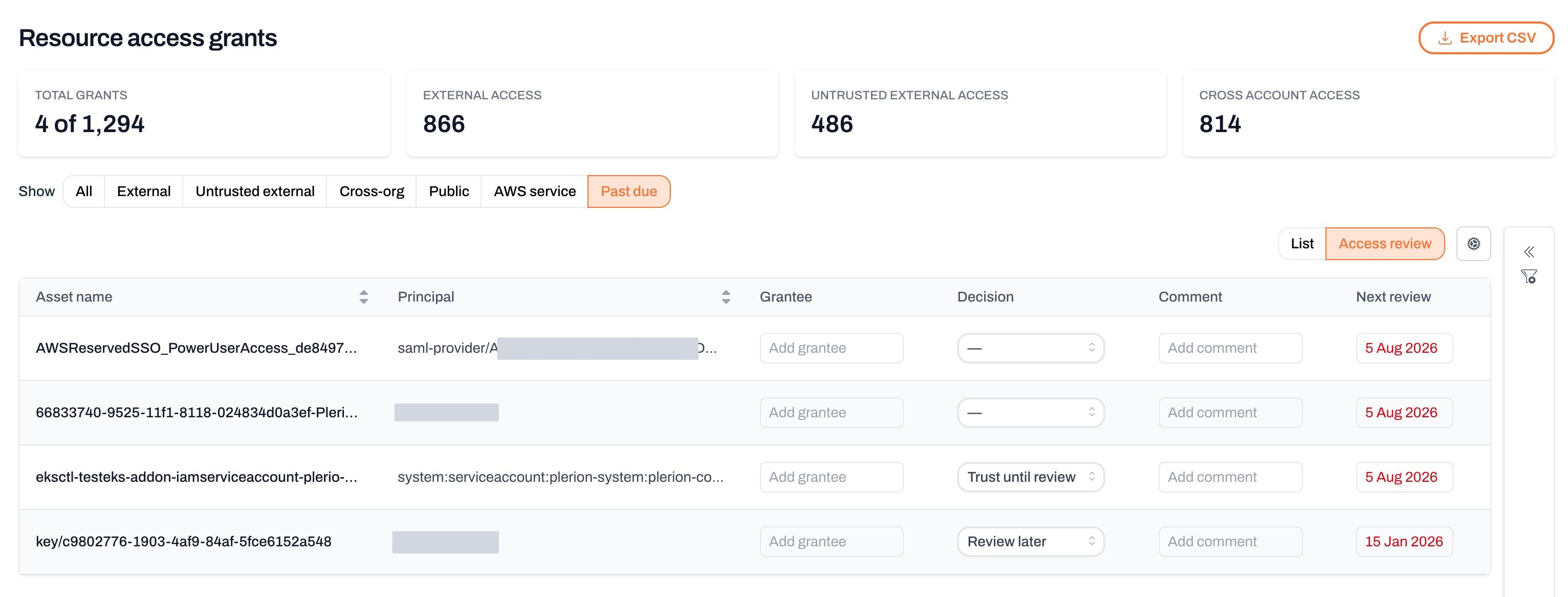
The grants table has two column layouts, chosen from the view control next to the column options above the table:- List shows the default reference columns (mechanism, scope, origin, and the rest).
- Access review replaces some of those columns with the editable Grantee, Decision, Comment, and Next review fields.
Reviewing in the grant detail
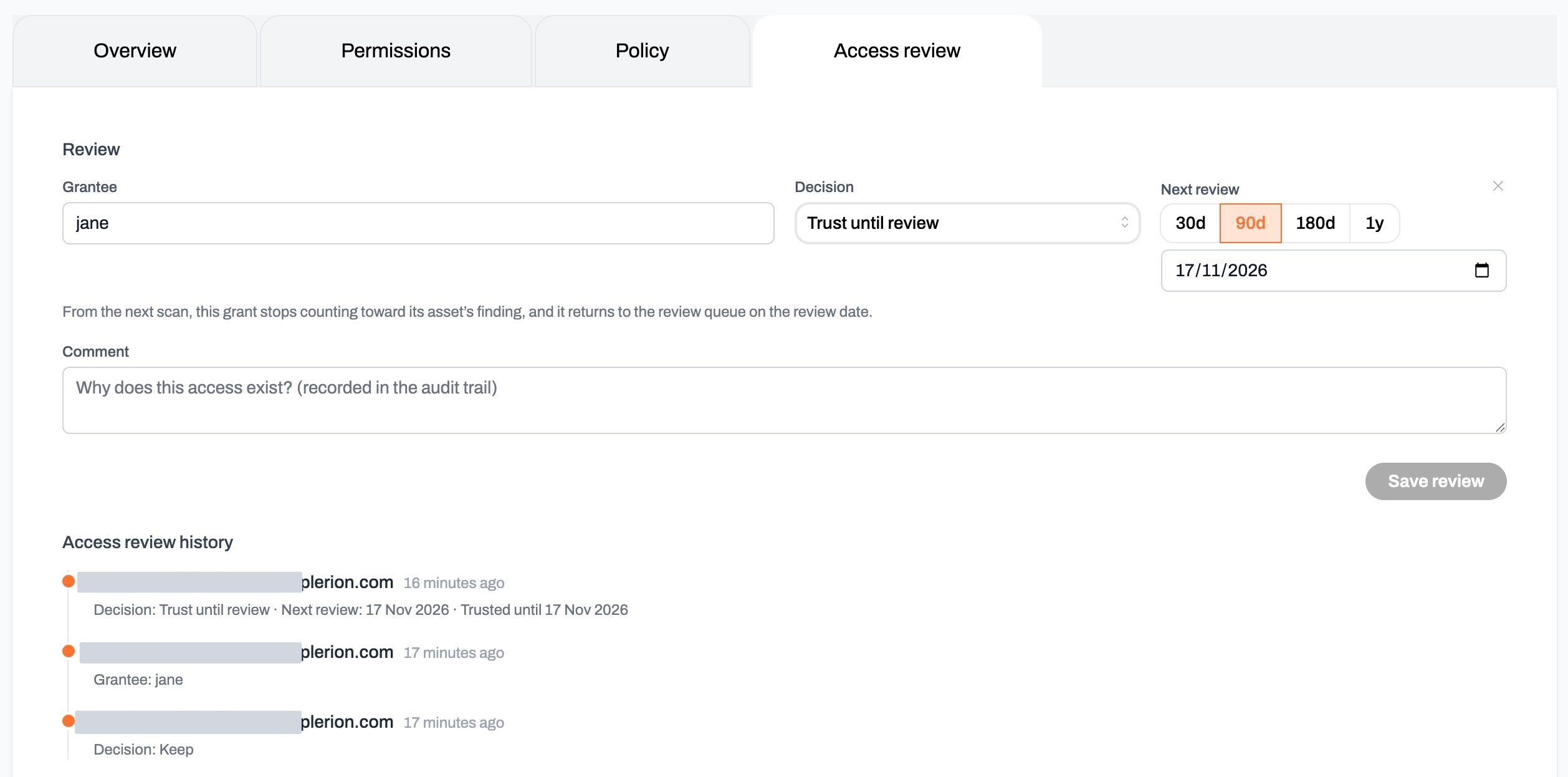
Select any row to open the grant’s slide-over, then open the Access review tab. The tab shows the same review fields for that one grant, with Grantee, Decision, and Next review on a single line and Comment below. Unlike the table, the tab does not save as you type. Change what you need, then selectSave review. The whole edit is recorded as one history entry.
Trusting a grant until its review date
SelectTrust until review to accept a single grant for a fixed period. Plerion sets the grant’s Trust to Trusted and shows the end date on the badge, for example Trusted until 31 Jan 2027. From the next scan, the grant stops counting toward its asset’s untrusted external access finding. Trust is recalculated on every scan, so a window you open, a review date you edit, and a window that runs out all take effect on the next scan rather than immediately.
Use it when access is expected but you do not want to trust the principal everywhere. Adding a principal to your trusted principals list clears its grants across every resource it touches and does not expire. Trust until review covers one grant and ends on a date you choose.
Trust until review is available on external grants only. Internal grants raise no findings, so there is nothing to suppress.
Setting the trust window
SelectTrust until review and the review-date picker opens. It offers 30d, 90d, 180d, and 1y, or you can pick a date.
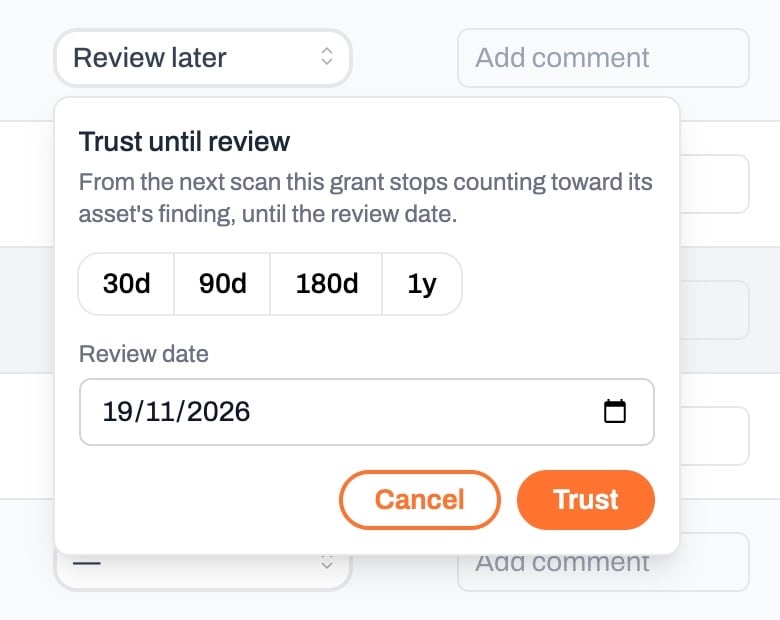
- A review date is required. Without one the trust window would have no end.
- The date must be in the future.
- The window can run at most one year ahead. Re-trusting is always available, so a long-lived grant comes back for a decision each year instead of being suppressed permanently.
- If the grant’s permissions changed while it was trusted, moving the review date out is refused. Review the grant as it stands now, then trust it again if it is still expected.
When trust ends
A trust window closes in three ways, and the Trust badge tooltip says which one applied.
The third case is the one that needs a person. Plerion records the exact permissions you approved, so a policy that is later widened cannot inherit the trust you gave the narrower version. Reordering actions, changing their case, or reordering condition keys does not end trust, because the access is unchanged.
Plerion does not notify you when a window closes. The grant starts failing its asset’s finding again on the next scan, and the
Past due preset lists the grants whose review date has passed.
Review history
The Access review tab also shows the grant’s review history below the fields, newest first. Each entry records who made the change, when they made it, and what changed. Entries capture only the fields that changed, so the history reads as a running account of the grant’s review rather than a repeated snapshot. Some entries are recorded by Plerion rather than by a person, and show System as the author. These are the points where a trust window opened or closed on its own, such as a window reaching its end date.Related pages
- Resource access grants overview: The full inventory, presets, and filters.
- External access: The grants that reach principals outside your organization.
- Trusted principals: Confirm which external principals are expected.
- Untrusted external access findings: How unconfirmed external grants surface as findings.