
PlerionAWSAccessStack and similar stacks created via the automated setup).
Why use auto stack update
Manually updating CloudFormation stacks can be time-consuming and risky if delayed. Auto stack update helps you:- Stay on supported stack versions
- Receive infrastructure improvements and security enhancements sooner
- Reduce manual operational effort
- Maintain clear visibility and control over every update
How auto stack update works
The system follows a secure, multi-phase lifecycle designed around defense-in-depth principles.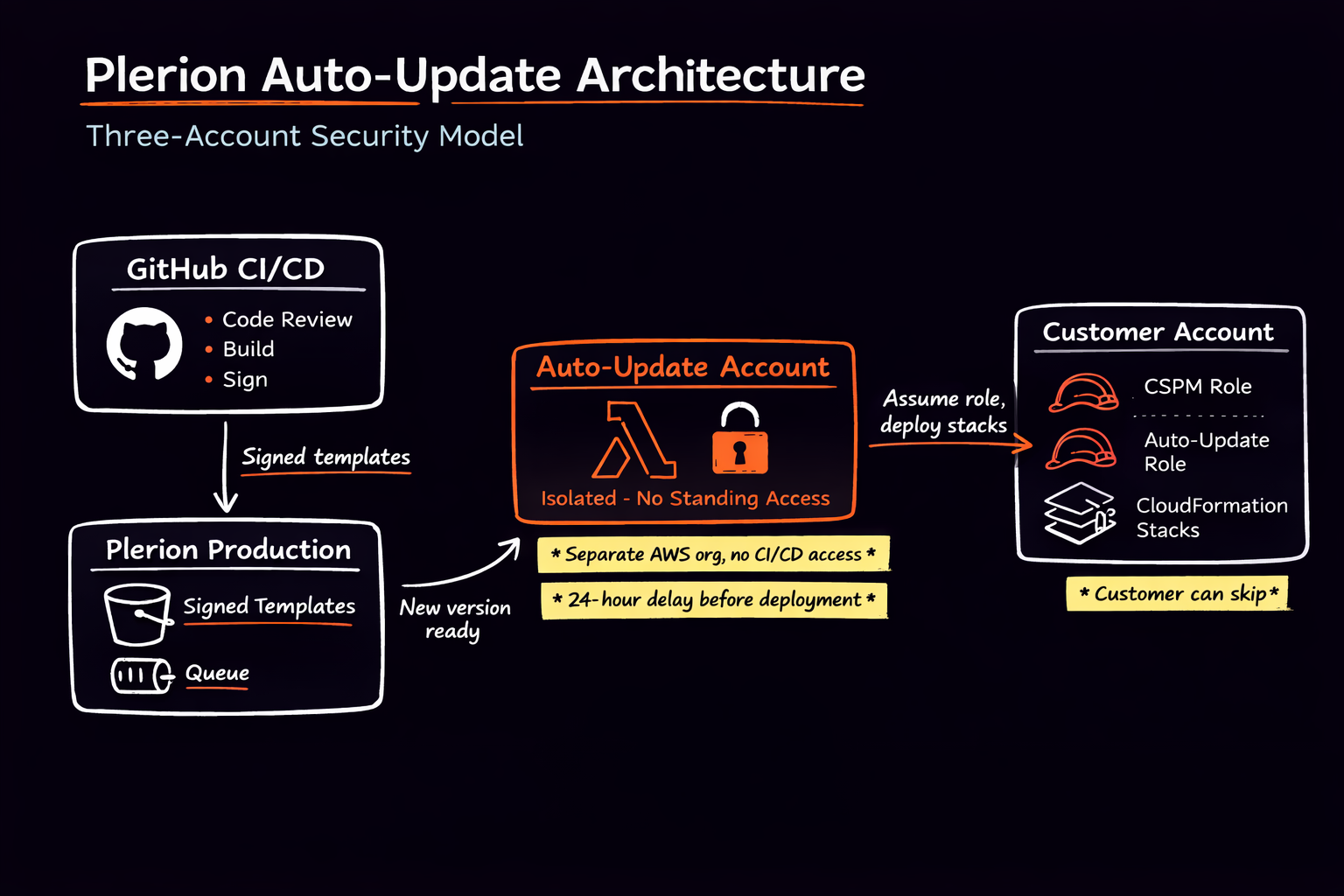
Understanding the access model
Auto stack update requires a dedicated IAM role in your AWS account so Plerion can perform CloudFormation stack updates on your behalf. Because stack updates can modify IAM policies and infrastructure components, this role necessarily has broad permissions within the scope of the Plerion stack. That level of access is required to apply updates safely and consistently. For this reason, the updater system is architected assuming breach. The execution environment is isolated in a dedicated, tightly controlled AWS account, and every update is cryptographically verified before deployment. You can review changes, skip versions, or disable automatic updates at any time.Phase 1 – Customer control and opt-out
Automatic updates are enabled by default. You can disable auto-updates at any time. Set theEnableAutoUpdate parameter to false in your stack parameters (AWS Console → CloudFormation → your stack → Parameters tab), or during initial stack creation. If disabled, no automatic changes are applied.
You can also:
- Skip specific versions
- Continue performing manual updates instead
- Re-enable or disable auto-update at any time
Phase 2 – Version publication and transparency
When a new stack version is published:- You are notified in the Plerion platform (for example, the Deployment panel on the integration page), where you can review scheduled updates, changelogs, and skip versions
- A changelog is provided
- A 24-hour grace period begins before any execution
- New permissions added
- Permissions modified
- Resources added or removed
- Infrastructure changes
6 This ensures you understand exactly what is changing before anything is applied.
Every stack template version is cryptographically signed at publication time. Before any update runs, the system:
- Verifies the template’s cryptographic signature
- Confirms the version has not been altered
- Rejects execution if verification fails
Phase 3 - Eligibility and scheduling controls
When a new version becomes available, the system evaluates each account. An update is scheduled only if:- Auto-update is enabled
- The account is in a valid state
- Template signature verification succeeds
- You to review the changelog
- You to skip the version
- Plerion’s security team to halt rollout if required
Secure execution architecture
Dedicated updater account isolation
Updates execute from a dedicated AWS account that is separate from:- Core Plerion production services
- Customer data processing systems
Controlled role assumption and least privilege
Your AWS account exposes a dedicated IAM role for stack updates. This role:- Can only be assumed by a specific role in the updater account
- Is scoped to CloudFormation update actions
- Can only update stacks whose names start with
Plerion-(your other stacks cannot be modified) - Does not grant broader administrative access
Controlled messaging and execution flow
Update execution is triggered through structured internal messaging mechanisms.- Only authorized Plerion systems can enqueue update instructions
- The updater account does not accept arbitrary external requests
- Execution logic validates all inputs before proceeding
Runtime verification and safeguards
Immediately before execution:- Template signatures are re-verified
- Target version information is validated
- Account eligibility is re-confirmed
- It is retried in a controlled manner
- You are notified
- You may intervene before subsequent attempts
Cooling-off and intervention controls
Between version processing and execution, a cooling-off period allows:- Detection of anomalous behaviour
- Manual intervention by Plerion’s security team if necessary
- Controlled pause of rollout
External Id
Role assumption requires an ExternalId that is unique to your integration. This prevents confused deputy attacks by ensuring that only Plerion can assume the update role in your account; other parties cannot assume it without knowing this shared value.
Customer visibility and controls summary
You retain full control over auto-updates:- Opt out at any time
- Skip specific versions
- Review changelogs before updates
- View scheduled update timing
- Continue using manual updates instead
Defense-in-depth summary
The auto stack update system combines:- Cryptographic template signing and verification
- Strict IAM role scoping and controlled assume-role paths
- Dedicated AWS account isolation
- Structured and restricted messaging channels
- Grace periods and cooling-off safeguards
- Full customer visibility and skip mechanisms
- Stack update restriction (Plerion only)