
Trusted in the resource access grants inventory and no longer raise untrusted external access findings.
A trusted principal is an external principal you have confirmed is expected to have access. It can be an AWS account, a whole AWS organization, an IAM role or user, a Cognito identity pool, or a federated identity such as a GitHub OpenID Connect (OIDC) organization or a Security Assertion Markup Language (SAML) provider.
Trust until review decision on that grant.
Where to manage trusted principals
Trusted principals are configured per detection profile, so different parts of your estate can apply different trust decisions.1
Open a profile
Go to
Settings > Profiles and select the profile you want to edit.2
Select the Trusted principals tab
Open the Trusted principals tab to see and edit the principals trusted by that profile.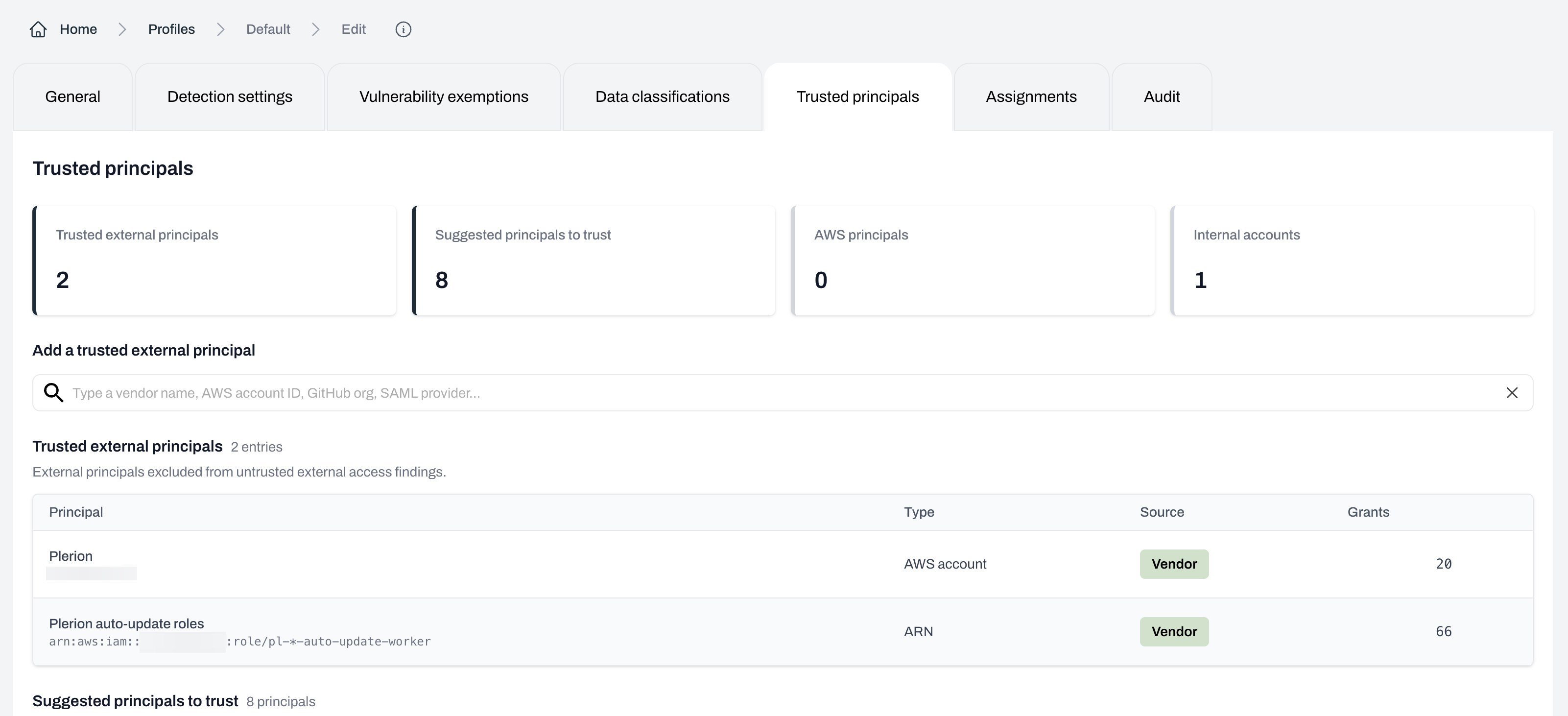
Inheritance from the default profile
A profile that has never had its own trusted principals set inherits them from the tenant’s default profile:- While it inherits, the table header notes how many entries are inherited and from which profile.
- The first time you save a change on that profile, it keeps its own list and stops following the default.
- Emptying a list is a decision Plerion keeps. A profile whose list you clear stays empty rather than falling back to the default.
What the tab shows
The tab opens with four summary tiles: Trusted external principals, Suggested principals to trust, AWS principals, and Internal accounts. The Trusted external principals table lists the principals this profile trusts. The help text states that these are “External principals excluded from untrusted external access findings.” Each row shows:
Select
Export CSV above the table to download the list, including each entry’s type, identifier, source, and comment.
Adding a trusted principal
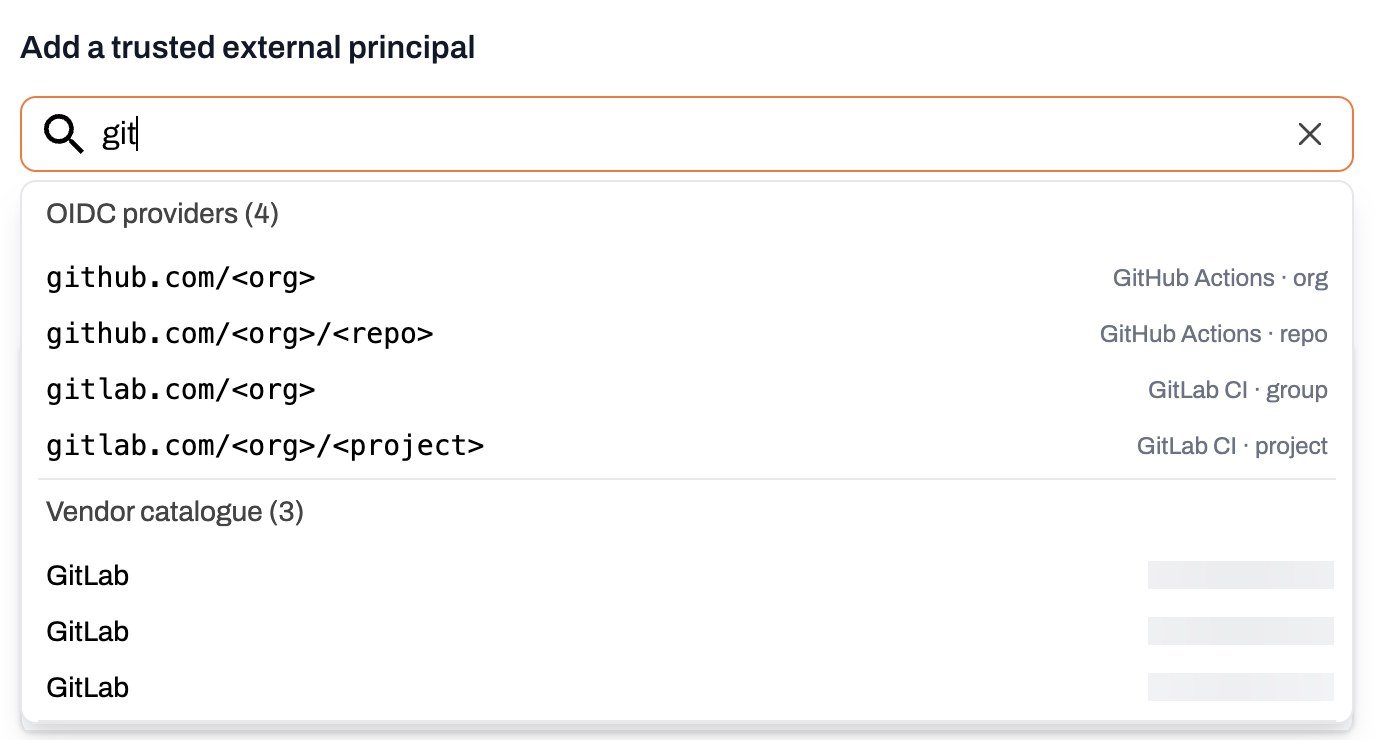
Use the Add a trusted external principal field to search for and add a principal. Its placeholder reads “Search vendors, or paste an account ID, ARN or organization ID.” Select the field before typing and Plerion offers five templates under Ways to add, each showing the shape of a value it accepts:- A known software-as-a-service (SaaS) vendor: Start typing a vendor name, such as
Datadog, and select it from the catalog of published vendor AWS account IDs. Plerion fills in the account ID for you. - An AWS account ID: A 12-digit ID, for example
123456789012. SelectAdd AWS account. - An AWS organization ID: An ID in the form
o-abc123defg. SelectAdd AWS organizationto trust every account in a partner’s organization. - An IAM ARN: A role or user ARN, for example
arn:aws:iam::123456789012:role/my-role. SelectAdd ARN. - A federated identity: The provider shorthand, for example
github.com/myorgorgitlab.com/mygroup/myproject. Plerion recognizes GitHub, GitLab, Buildkite, HCP Terraform, and CircleCI.
Wildcards in ARNs
An ARN entry accepts* in the role or user name, so one entry can cover a family of roles. For example, arn:aws:iam::123456789012:role/pl-*-auto-update-worker matches every stage and region variant of that role.
* is the only wildcard. Every other character is matched literally, including ?, and the pattern has to match the whole ARN rather than part of it. ARNs in the aws, aws-cn, aws-us-gov, and AWS ISO partitions are all accepted.
Bitbucket
Bitbucket Pipelines is recognized in your grants but has no shorthand in the add field, because its audience value is specific to your workspace. Trust a Bitbucket identity from the Suggested principals to trust table or from the finding’s Access grants tab, where Plerion already has the values it needs.Suggested principals
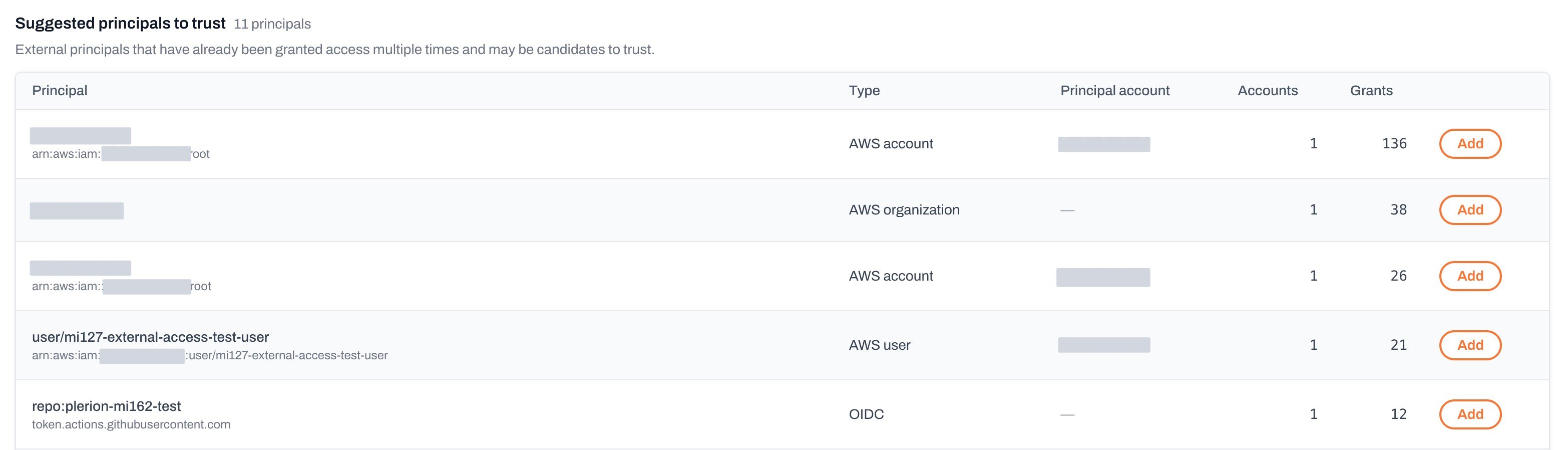
The Suggested principals to trust table lists “External principals that have already been granted access multiple times and may be candidates to trust.” In practice, a principal is suggested when it holds at least 10 active grants and is not already trusted. For each suggestion you see the principal, its type, its AWS account, how many of your accounts it has access in, and its total number of grants. SelectAdd to move it into your trusted principals list. The button changes to Added once selected.
- Your own accounts. Plerion compares suggestions against the AWS accounts you have onboarded and drops anything that names one of them.
- Wildcard principals. A
*principal is access to fix, not a principal to trust. - AWS service principals. These appear under AWS principals instead.
- Broad identity providers. A federated grant that names a shared provider host without narrowing to your own organization is not suggested. Trusting it would cover every customer of that provider, not just you.
Add button when Plerion cannot rebuild a complete trust entry from the grant alone. This affects Cognito grants with no resolvable identity pool, OIDC grants whose provider Plerion does not recognize, and every SAML principal. The finding’s Access grants tab builds its entry the same way, so a principal with no button here has none there either.
Where the provider has a shorthand, type it into the add field instead. SAML principals cannot be added by any route today.
Suggestions are calculated by comparing grants against your own AWS accounts, so Plerion needs at least one onboarded AWS account or AWS Organization to produce them. If your accounts cannot be loaded, the tab says so rather than showing a partial list.
Principals Plerion trusts for you
Some principals are trusted without you adding them.- AWS principals: AWS-owned service principals (
*.amazonaws.com), described in the tab as “Implicitly trusted and cannot be edited.” - Internal accounts: “AWS accounts in your Organization or integrated with Plerion. Implicitly trusted and cannot be edited.” This covers two groups: accounts in the same AWS organization as the resource, and accounts you have onboarded to Plerion even when they sit in a different AWS organization. An onboarded outside account keeps its true
Cross-orgscope in the inventory, so you can still see the account boundary, but it raises no finding. - AWS Support: The AWS Support principal used to restore Amazon Redshift snapshots is always trusted.
Plerion’s own accounts
Your tenant’s default profile starts with two entries for Plerion’s own access, shown with aVendor source:
Without these, Plerion’s own access to your accounts would be reported as untrusted external access on every resource it touches.
Removing a trusted principal
SelectRemove on the principal’s row in the Trusted external principals table, then select Update to save as you would for an addition.
Inherited entries and implicitly trusted principals have no Remove button. Neither do the two Plerion entries described above, so Plerion’s own access to your accounts cannot be untrusted from this tab.
Related pages
- Resource access grants: The inventory of every grant to a principal.
- External access: The grants that reach outside your organization.
- Access review: Record a decision on one grant, or trust it until its review date.
- Untrusted external access findings: What happens to external grants that are not yet trusted.