
There are two types of stacks that may need updates:
- Permission Stack: Grants Plerion access to the service account through IAM roles and policies.
- Region Stacks: Provisions the infrastructure required to run Plerion Service Account Appliances, including VPCs, subnets, security groups, and auto-scaling resources.
Steps to update a service account stack
1
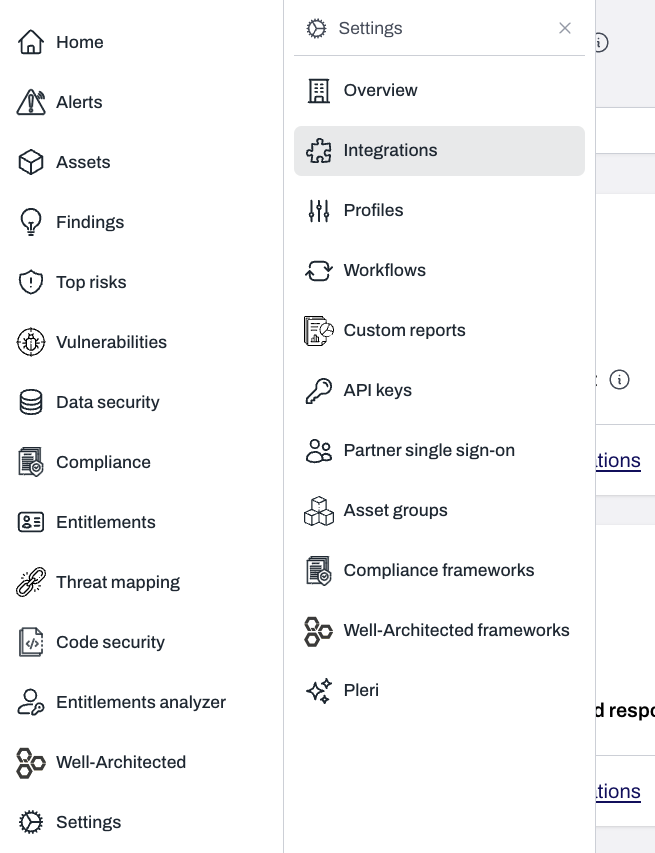
On the Plerion dashboard, go to Settings > Integrations
2
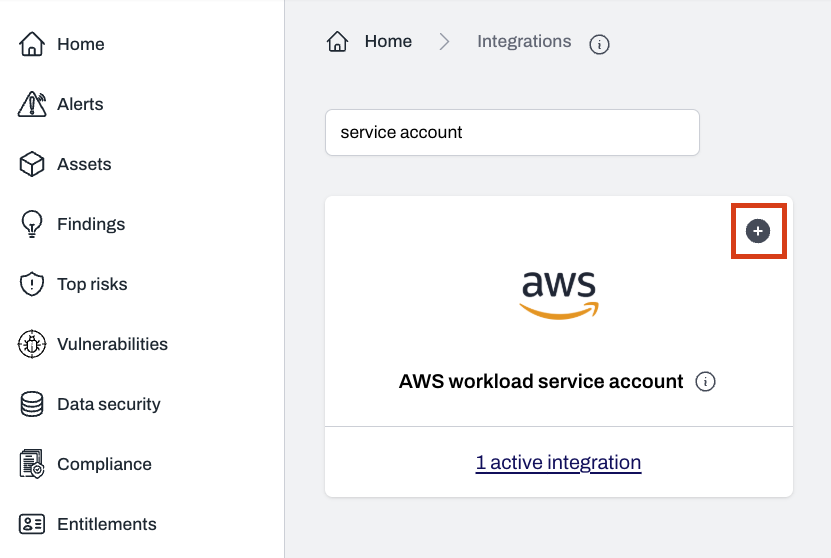
Find AWS workload service account and click the + button
3
Choose the service account to update
4
Select the stack to update
- For Permission Stack, go to the
Settingstab. - For Region Stacks, go to the
Regionstab.
5
Click Launch Stack or follow CLI commands
Click
Launch Stack to update the stack using the AWS Console, or follow the CLI instructions provided on-screen to perform the update manually.Updating a stack created before the registration change
Stacks created before Plerion removed theAuthToken parameter registered through a Lambda function in your account that called the Plerion API. The current templates register through a custom resource that reports to Plerion’s registration topic instead, so no token is needed. Updating an older stack to the current template is a normal stack update, with two things to know:
- The Region Stack asks for
TenantIdonce, on that first update. Copy it from the region’s update guide in Plerion. - The Permission Stack needs no new input.
TenantIdis optional on this stack, so it can stay blank.
PlerionRegistration resource. Updating from the AWS console drops the removed AuthToken parameter automatically. If you update with a script that still passes ParameterKey=AuthToken,UsePreviousValue=true, the update fails with Parameters: [AuthToken] do not exist in the template. Remove that line from the command.
Service account stacks are not updated automatically. An older stack keeps working until you update it.
Why an update can roll back
Older stacks reported success to CloudFormation even when Plerion rejected the registration, so a failed update left a stale record behind. The current templates fail the update instead, and CloudFormation rolls the stack back. An update rolls back when:- The
ExternalIdparameter no longer matches the one Plerion holds for your tenant. - The stack was changed so that the role or network it reports is no longer part of that stack.
- Another stack in the same account registered the service account or region. Only that stack can change it until it is deleted.
- For a Region Stack update, the service account no longer exists in Plerion. Update the Permission Stack first to register the service account again.