
Agentless solution
Plerion’s workload security solution is fully agentless, eliminating the need to install software on Azure workloads. Instead, Plerion deploys ephemeral scanning appliances within your Azure subscription. These appliances automatically assess workloads and provide comprehensive visibility into their security posture. Each appliance is a short-lived Azure Virtual Machine (VM) deployed in a dedicated, Plerion-managed resource group. Appliances run in the same Azure region as the workloads being scanned to ensure efficiency, data locality, and compliance with regional requirements.Onboarding process
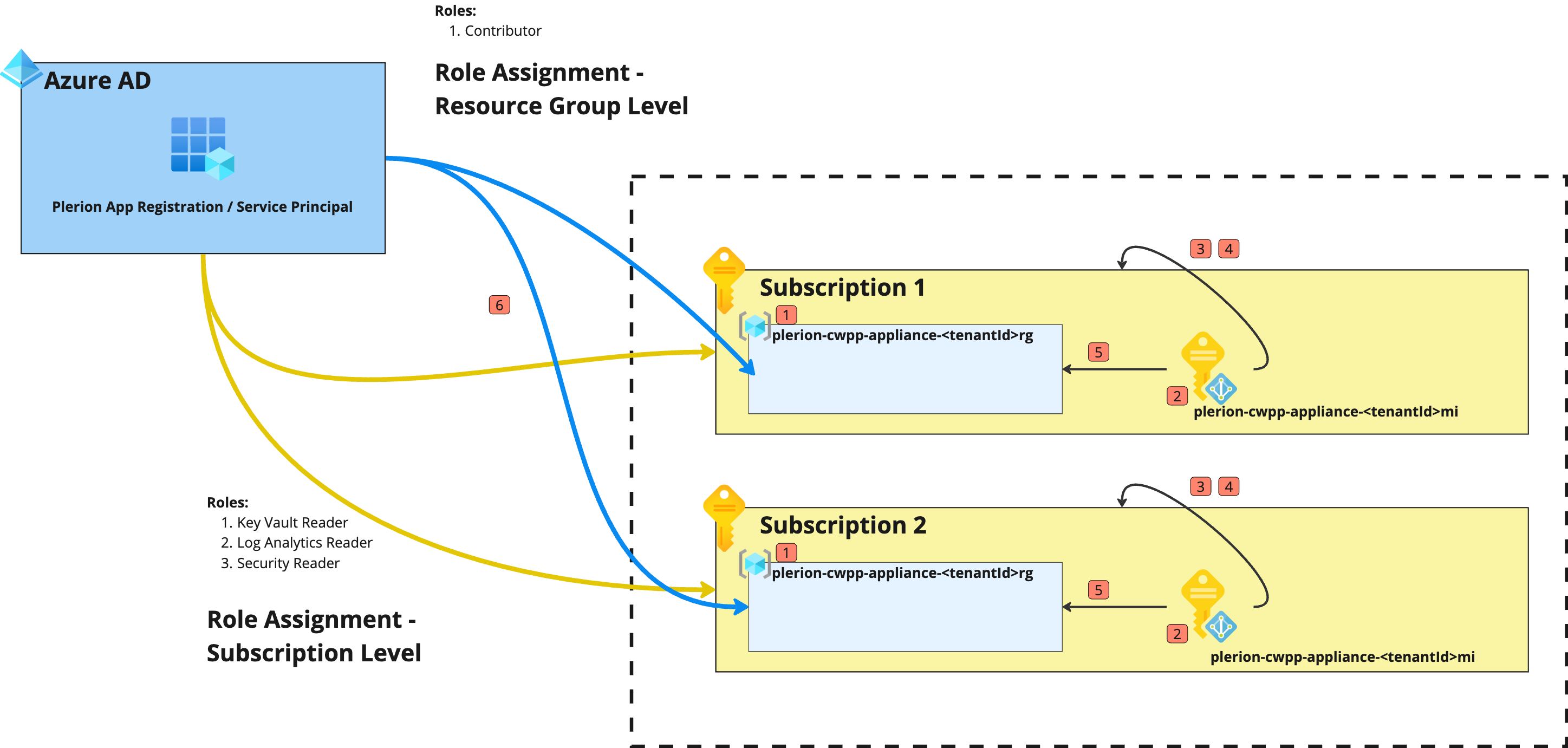
Before onboarding CWPP for an Azure subscription, make sure a Microsoft Entra ID integration is already configured in Plerion. CWPP uses the same App Registration created during that integration.For setup instructions, see Getting started with Microsoft Entra ID.
Steps to onboard an Azure subscription
1
Create a dedicated resource group
<plerionTenantId> is the tenant ID of your Plerion tenant, available on the Plerion platform.2
Create a user-managed identity
3
Assign required permissions
Plerion control plane
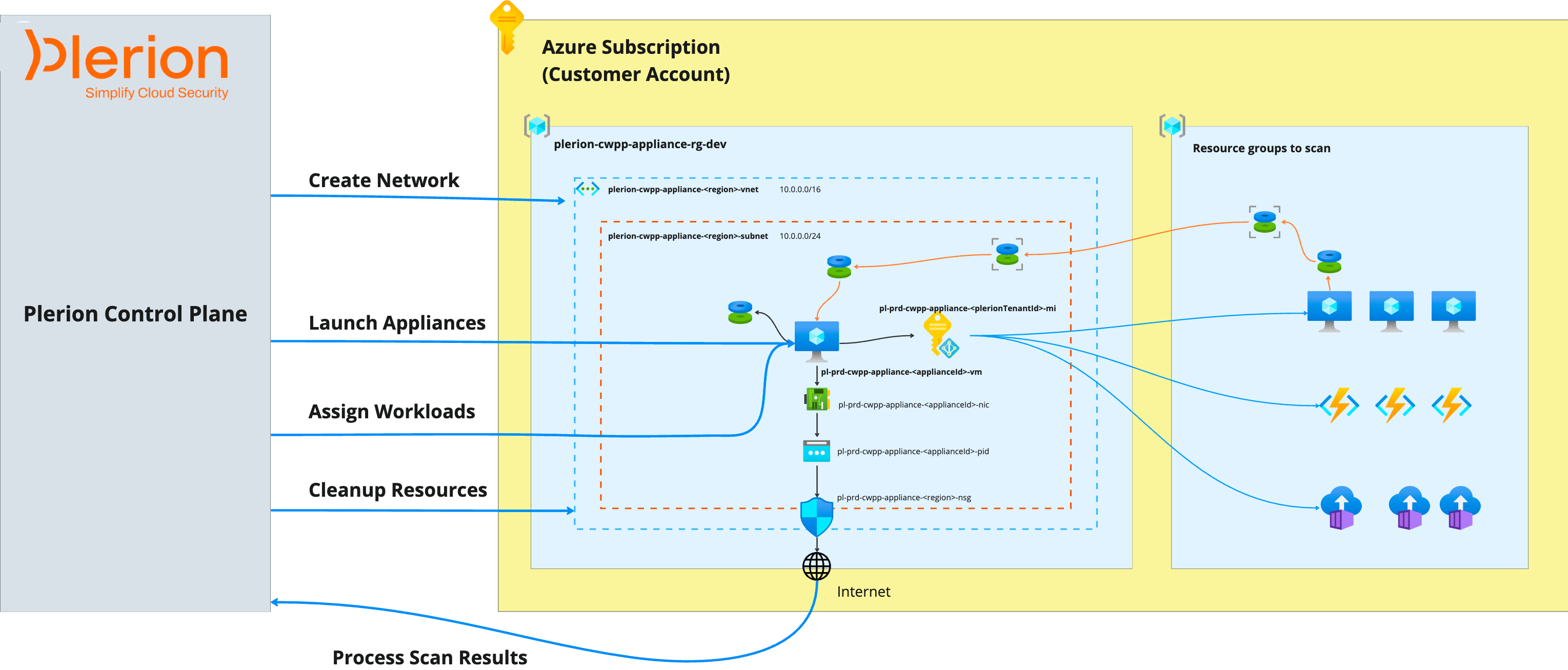
- Creates virtual networks in Azure for appliance communication
- Launches appliances in the subscription
- Assigns workloads to appliances for scanning
- Manages appliance lifecycle operations
- Collects and processes scan results
1
Network configuration
The Plerion Control Plane creates a virtual network (VNet) in the Azure subscription for appliances to securely communicate with the Plerion platform.Virtual network configuration
Subnet configuration
Network security group configuration
Custom network configurations are not currently supported. Support for custom networks will be added in future releases.
2
Launching appliances
The Control Plane launches appliances in the dedicated resource group created during onboarding.Appliances are deployed in the same region as the workloads being scanned, using the following configuration:
3
Assigning workloads to appliances
Each appliance scans a batch of workloads of one type: up to 3 virtual machines or scale sets (each needs a disk snapshot), or up to 20 web apps, functions, container apps or container groups. The number of appliances per region follows the number of workloads and the subscription’s vCPU quota. See Azure workload coverage for how each workload type is scanned.
4
Managing appliance lifecycle
The Plerion Control Plane manages the full lifecycle of appliances, including:
- Starting appliances
- Deleting appliances
5
Collecting scan results
After completing the scan, appliances send their results to the Plerion Control Plane.The Control Plane stores and processes these results in the Plerion platform, making them available for review.Plerion Workload Scanner collects only security-related metadata from workloads. When combined with telemetry from CSPM and CIEM capabilities, this data provides rich context to help prioritize and remediate security issues.
The Plerion Workload Scanner does not collect raw data, PII/PHI, or sensitive business information.
Monitoring resources created by Plerion
All resources required for CWPP are deployed within the dedicated resource group (plerion-cwpp-appliance-<plerionTenantId>-rg) created during onboarding.Resources are prefixed with
plerion-cwpp-* and tagged with Owner=Plerion.
Benefits of a dedicated resource group:
- Simplifies monitoring and identification of Plerion-created resources
- Enables easy cleanup of Plerion resources
- Provides clear visibility into resource costs and supports budget tracking