> ## Documentation Index
> Fetch the complete documentation index at: https://docs.plerion.com/llms.txt
> Use this file to discover all available pages before exploring further.
# Resource access grants
> View every grant that gives a principal access to your AWS resources, classified by scope, origin, and trust
With **[resource access grants](https://app.plerion.com/entitlements/access-grants)**, you can see every way a resource in your AWS environment gives access to a principal, judge each one on its own, and decide which to keep.
***
## What a resource access grant is
A **resource access grant** is how Plerion describes one way a single resource gives access to a single principal.
* The **resource** is something in your environment, such as an S3 bucket, a Key Management Service (KMS) key, or an IAM role.
* The **principal** is whoever the resource lets in: an AWS account, a role or user, an AWS service, or a federated identity such as an OpenID Connect (OIDC) or Security Assertion Markup Language (SAML) provider.
A single policy on a resource often allows several principals at once. Plerion breaks that policy apart so each resource-and-principal pairing becomes its own grant. Because each pairing stands on its own, you can review, classify, and act on it separately from every other grant on the same resource.
Plerion evaluates what is *granted* (configured to be allowed), not what is *used* (observed in logs). A principal can hold a grant it never exercises.
***
## What Plerion evaluates
Plerion builds grants from the policies attached to your resources and identities. Today it evaluates:
* **Resource-based policies**: The policy attached directly to a resource, such as an S3 bucket policy, a KMS key policy, or an SQS queue policy.
* **IAM role trust policies**: The policy that controls which principals can assume an IAM role, including federated principals such as OIDC and SAML identity providers.
Coverage of resource types expands over time. Plerion does not evaluate access that has no AWS-side record of the recipient, such as IAM access keys or API keys, and it does not process Service Control Policies (SCPs) or Resource Control Policies (RCPs).
***
## Where to find access grants
Access grants live on the **Entitlements** page.
In the Plerion side navigation, go to [Entitlements](https://app.plerion.com/entitlements/access-grants).
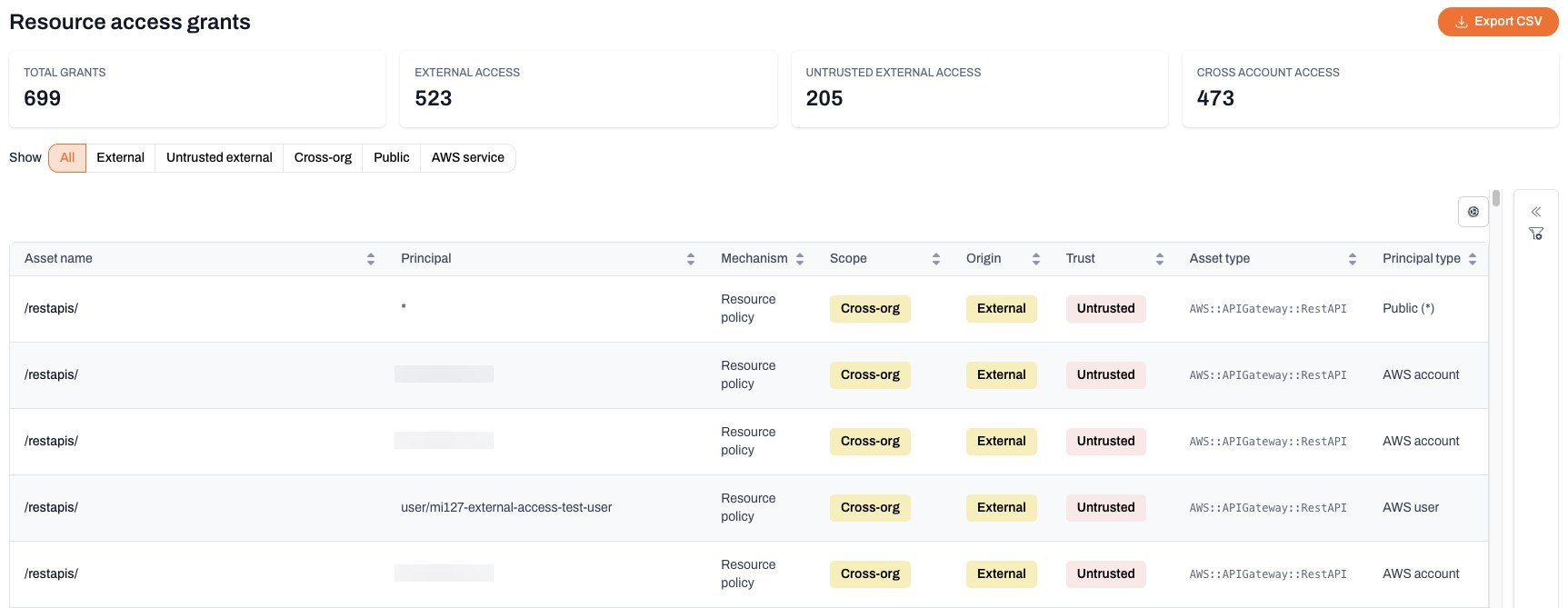
The **Access grants** tab is the first tab on the page and opens the **Resource access grants** inventory.
 ***
## How Plerion classifies each grant
Every grant is described by three independent attributes so you can judge it at a glance.
### Scope
Scope describes how far the access reaches.
| Scope | Meaning |
| -------------- | ------------------------------------------------------------------------------------------- |
| `Public` | The principal is a wildcard (`*`) with no restricting conditions. Anyone can use the grant. |
| `Cross-org` | A specific AWS account outside your organization. |
| `Federated` | An external identity provider, such as an OIDC or SAML principal. |
| `Same-org` | An account in your AWS organization. |
| `Same-account` | The resource's own account. |
| `AWS service` | An AWS service acting on your behalf, such as Lambda or S3 replication. |
### Origin
| Origin | Meaning |
| ---------- | --------------------------------------------------------------------------------------------- |
| `External` | The principal is outside your AWS organization (`Cross-org`, `Federated`, or `Public`). |
| `Internal` | The principal is inside your AWS organization (`Same-org`, `Same-account`, or `AWS service`). |
### Trust
| Trust | Meaning |
| -------------- | ----------------------------------------------------------------------------------------------------------------------------------------------------------------- |
| `Trusted` | The principal is covered by trust, either on your [trusted principals](/guides/platform/resource-access-grants/trusted-principals) list or trusted automatically. |
| `Untrusted` | An external principal that is not covered by trust. These are the grants Plerion raises findings for. |
| `Unclassified` | Trust has not been evaluated yet. |
Principals inside your own AWS organization and AWS's own service principals are trusted automatically. They appear under **Internal accounts** and **AWS principals** on the [trusted principals](/guides/platform/resource-access-grants/trusted-principals) page and can't be removed from the trusted list.
See [External access](/guides/platform/resource-access-grants/external-access) for how Plerion uses these attributes to surface the access that leaves your organization.
***
## Reviewing the inventory
The **Resource access grants** view summarizes your grants in four tiles: **Total grants**, **External access**, **Untrusted external access**, and **Cross account access**.
### Preset views
Use the **Show** chips above the table to jump to a common slice of the data:
| Preset | Shows |
| -------------------- | --------------------------------------------------------------------------------------------------- |
| `All` | Every grant, internal and external. |
| `External` | Grants to principals outside your AWS account. |
| `Untrusted external` | External grants not on your trusted principals list. These are the ones most likely to need review. |
| `Cross-org` | Grants to an AWS account outside your organization. |
| `Public` | Grants open to everyone through a wildcard principal. |
| `AWS service` | Grants to AWS services acting on your behalf. |
### Filters
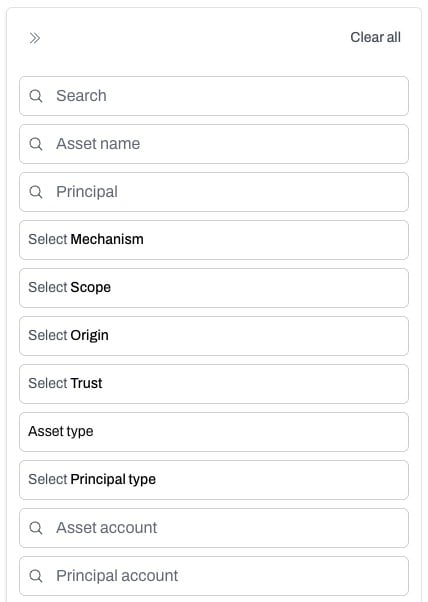
Open the filter panel to refine the table by any attribute, including **Scope**, **Origin**, **Trust**, **Asset type**, and **Principal type**, or search by asset and principal name. You can also select any badge in a row to filter by that value.
***
## How Plerion classifies each grant
Every grant is described by three independent attributes so you can judge it at a glance.
### Scope
Scope describes how far the access reaches.
| Scope | Meaning |
| -------------- | ------------------------------------------------------------------------------------------- |
| `Public` | The principal is a wildcard (`*`) with no restricting conditions. Anyone can use the grant. |
| `Cross-org` | A specific AWS account outside your organization. |
| `Federated` | An external identity provider, such as an OIDC or SAML principal. |
| `Same-org` | An account in your AWS organization. |
| `Same-account` | The resource's own account. |
| `AWS service` | An AWS service acting on your behalf, such as Lambda or S3 replication. |
### Origin
| Origin | Meaning |
| ---------- | --------------------------------------------------------------------------------------------- |
| `External` | The principal is outside your AWS organization (`Cross-org`, `Federated`, or `Public`). |
| `Internal` | The principal is inside your AWS organization (`Same-org`, `Same-account`, or `AWS service`). |
### Trust
| Trust | Meaning |
| -------------- | ----------------------------------------------------------------------------------------------------------------------------------------------------------------- |
| `Trusted` | The principal is covered by trust, either on your [trusted principals](/guides/platform/resource-access-grants/trusted-principals) list or trusted automatically. |
| `Untrusted` | An external principal that is not covered by trust. These are the grants Plerion raises findings for. |
| `Unclassified` | Trust has not been evaluated yet. |
Principals inside your own AWS organization and AWS's own service principals are trusted automatically. They appear under **Internal accounts** and **AWS principals** on the [trusted principals](/guides/platform/resource-access-grants/trusted-principals) page and can't be removed from the trusted list.
See [External access](/guides/platform/resource-access-grants/external-access) for how Plerion uses these attributes to surface the access that leaves your organization.
***
## Reviewing the inventory
The **Resource access grants** view summarizes your grants in four tiles: **Total grants**, **External access**, **Untrusted external access**, and **Cross account access**.
### Preset views
Use the **Show** chips above the table to jump to a common slice of the data:
| Preset | Shows |
| -------------------- | --------------------------------------------------------------------------------------------------- |
| `All` | Every grant, internal and external. |
| `External` | Grants to principals outside your AWS account. |
| `Untrusted external` | External grants not on your trusted principals list. These are the ones most likely to need review. |
| `Cross-org` | Grants to an AWS account outside your organization. |
| `Public` | Grants open to everyone through a wildcard principal. |
| `AWS service` | Grants to AWS services acting on your behalf. |
### Filters
Open the filter panel to refine the table by any attribute, including **Scope**, **Origin**, **Trust**, **Asset type**, and **Principal type**, or search by asset and principal name. You can also select any badge in a row to filter by that value.
 ### Export
Select **Export CSV** to download the grants currently shown in the table as a comma-separated values (CSV) file.
***
## Inspecting a grant
Select any row to open a slide-over with the full detail of that grant, organized into three tabs:
* **Overview**: The grant, asset, and principal in full, including the mechanism, service, scope, origin, principal type, and when the grant was first and last observed.
* **Permissions**: The actions the grant allows, any `NotActions`, and any conditions that restrict it.
* **Policy**: The raw policy document the grant came from, when the mechanism carries one.
### Export
Select **Export CSV** to download the grants currently shown in the table as a comma-separated values (CSV) file.
***
## Inspecting a grant
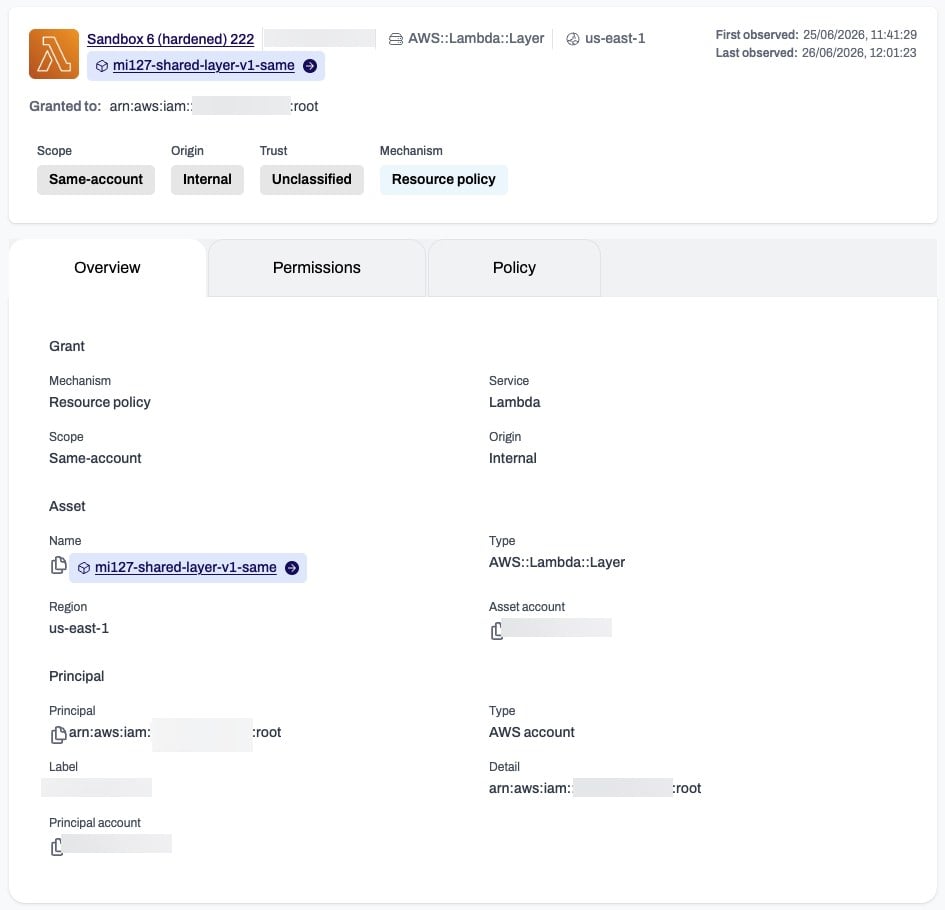
Select any row to open a slide-over with the full detail of that grant, organized into three tabs:
* **Overview**: The grant, asset, and principal in full, including the mechanism, service, scope, origin, principal type, and when the grant was first and last observed.
* **Permissions**: The actions the grant allows, any `NotActions`, and any conditions that restrict it.
* **Policy**: The raw policy document the grant came from, when the mechanism carries one.
 ***
## Related pages
* [External access](/guides/platform/resource-access-grants/external-access): The grants that reach principals outside your organization.
* [Trusted principals](/guides/platform/resource-access-grants/trusted-principals): Confirm which external principals are expected.
* [Untrusted external access findings](/guides/platform/resource-access-grants/findings): How unconfirmed external grants surface as findings.
***
## Related pages
* [External access](/guides/platform/resource-access-grants/external-access): The grants that reach principals outside your organization.
* [Trusted principals](/guides/platform/resource-access-grants/trusted-principals): Confirm which external principals are expected.
* [Untrusted external access findings](/guides/platform/resource-access-grants/findings): How unconfirmed external grants surface as findings.