> ## Documentation Index
> Fetch the complete documentation index at: https://docs.plerion.com/llms.txt
> Use this file to discover all available pages before exploring further.
# Untrusted external access findings
> Understand how grants to untrusted external principals surface as findings you can prioritize and resolve
With **untrusted external access findings**, you can treat unexpected third-party access as a security issue and work it like any other [finding](/guides/platform/findings-overview). When a resource grants access to a principal outside your AWS organization that you have not confirmed as trusted, Plerion raises a finding so the access shows up in your normal triage.
***
## How untrusted access becomes a finding
Plerion evaluates every grant in the [resource access grants](/guides/platform/resource-access-grants/overview) inventory. When a resource has one or more grants to an `Untrusted` external principal, Plerion:
* Sets the **Grants external access** context on the affected asset.
* Raises a finding against that asset.
Confirming the principal as a [trusted principal](/guides/platform/resource-access-grants/trusted-principals) reclassifies its grants and clears the finding on the next scan, so trusting expected access is the primary way to resolve these findings.
***
## Severity
Untrusted external access findings carry a severity level like any other finding, so you can prioritize them alongside the rest of your posture. Plerion rates each finding from the access the grant actually allows:
* A grant that allows broad or destructive actions scores higher than one limited to reading.
* Access to a resource holding classified data, or to a role that carries administrative or privilege-escalation rights, raises the score further.
* Conditions that restrict when the grant applies lower it.
Because the principal is untrusted, Plerion also treats the access as more likely to be a genuine exposure. When an asset has more than one untrusted grant, the finding takes the highest severity among them. See [Findings](/guides/platform/findings-overview#severity-levels) for what each severity level means.
***
## Finding untrusted external access
Go to the [Findings dashboard](https://app.plerion.com/findings).
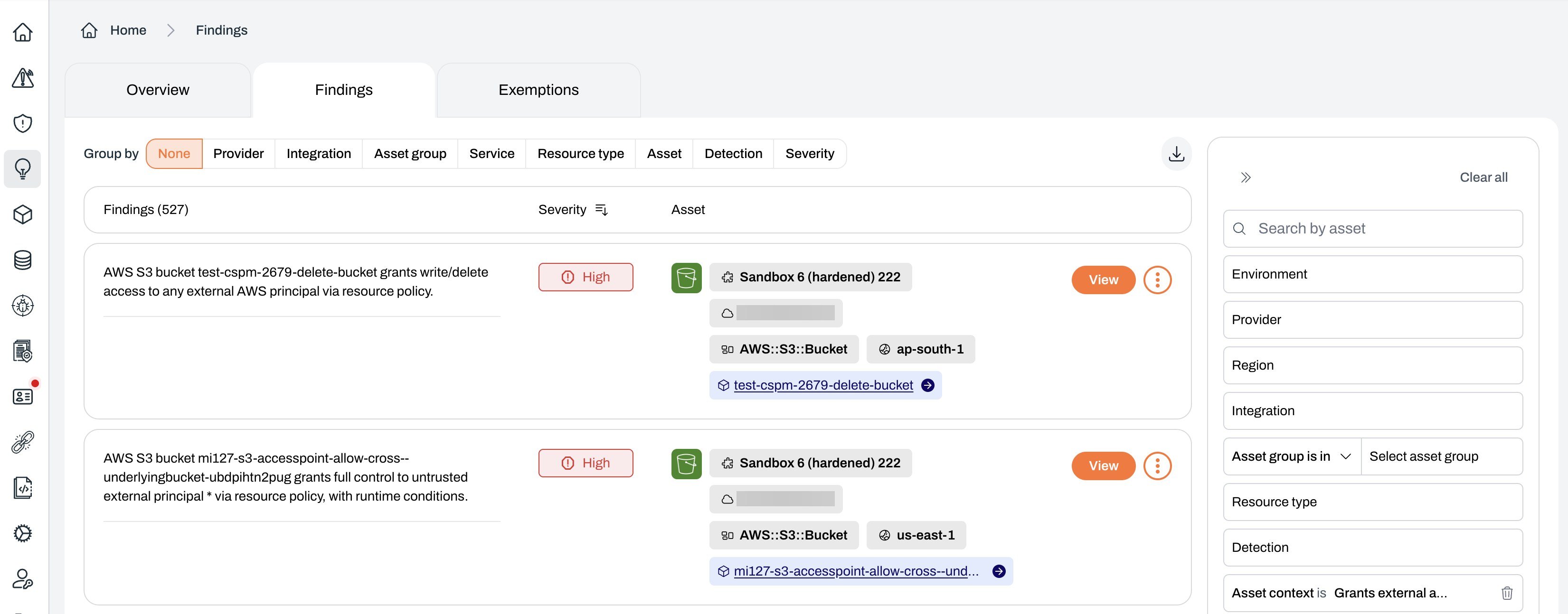
In the filter panel, set **Asset context** to **Grants external access** to show only the assets that grant external access.
 ***
## Understanding the finding detail
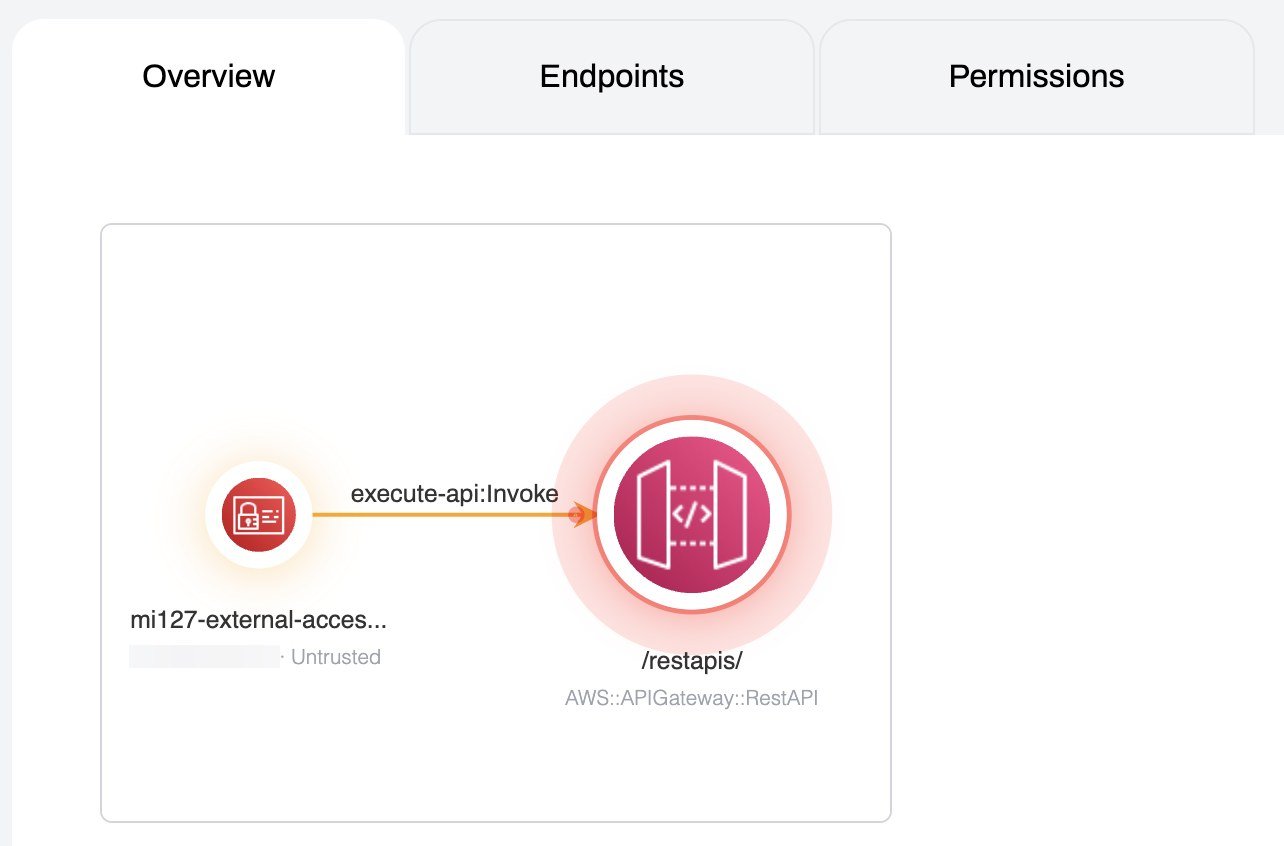
Select a finding to open its detail view. Alongside the standard finding summary, remediation guidance, and primary asset, the **Overview** shows an external access graph for the asset. The graph maps each external principal that holds a grant and labels it with its trust status, so you can see at a glance which principals are `Untrusted`, `Trusted`, or `Unclassified`.
***
## Understanding the finding detail
Select a finding to open its detail view. Alongside the standard finding summary, remediation guidance, and primary asset, the **Overview** shows an external access graph for the asset. The graph maps each external principal that holds a grant and labels it with its trust status, so you can see at a glance which principals are `Untrusted`, `Trusted`, or `Unclassified`.
 To see the exact actions and conditions behind a grant, open the matching row in the [resource access grants](/guides/platform/resource-access-grants/overview) inventory and use its **Permissions** and **Policy** tabs.
***
## Resolving a finding
You have two ways to resolve an untrusted external access finding:
* **Trust the principal**: If the access is expected, add the principal to your [trusted principals](/guides/platform/resource-access-grants/trusted-principals). The grant is reclassified and the finding clears on the next scan.
* **Remove or restrict the access**: If the access is not expected, change the resource policy or trust policy in AWS to remove the principal or tighten its conditions.
Prefer trusting expected principals over exempting the finding. Trusting keeps the access on record and visible in the inventory, and it stops the same access raising findings again across every resource it touches.
You can still exempt a finding when neither option fits, following the standard [exemption flow](/guides/platform/findings-overview#exempting-findings).
***
## Related pages
* [Resource access grants](/guides/platform/resource-access-grants/overview): The full inventory of grants to principals.
* [External access](/guides/platform/resource-access-grants/external-access): The grants that reach outside your organization.
* [Trusted principals](/guides/platform/resource-access-grants/trusted-principals): Confirm expected access so it stops raising findings.
To see the exact actions and conditions behind a grant, open the matching row in the [resource access grants](/guides/platform/resource-access-grants/overview) inventory and use its **Permissions** and **Policy** tabs.
***
## Resolving a finding
You have two ways to resolve an untrusted external access finding:
* **Trust the principal**: If the access is expected, add the principal to your [trusted principals](/guides/platform/resource-access-grants/trusted-principals). The grant is reclassified and the finding clears on the next scan.
* **Remove or restrict the access**: If the access is not expected, change the resource policy or trust policy in AWS to remove the principal or tighten its conditions.
Prefer trusting expected principals over exempting the finding. Trusting keeps the access on record and visible in the inventory, and it stops the same access raising findings again across every resource it touches.
You can still exempt a finding when neither option fits, following the standard [exemption flow](/guides/platform/findings-overview#exempting-findings).
***
## Related pages
* [Resource access grants](/guides/platform/resource-access-grants/overview): The full inventory of grants to principals.
* [External access](/guides/platform/resource-access-grants/external-access): The grants that reach outside your organization.
* [Trusted principals](/guides/platform/resource-access-grants/trusted-principals): Confirm expected access so it stops raising findings.