> ## Documentation Index
> Fetch the complete documentation index at: https://docs.plerion.com/llms.txt
> Use this file to discover all available pages before exploring further.
# GitLab
> Integrate Plerion Code Security with GitLab to scan repositories for infrastructure as code (IaC) issues and software composition analysis (SCA) issues directly in your development workflow.
With the [GitLab integration](https://app.plerion.com/settings/integrations/add/GitLab/GitLab), you can connect your repositories to Plerion Code Security. This enables automatic scanning for IaC and SCA issues, giving developers early feedback and helping teams resolve issues before they reach production.
***
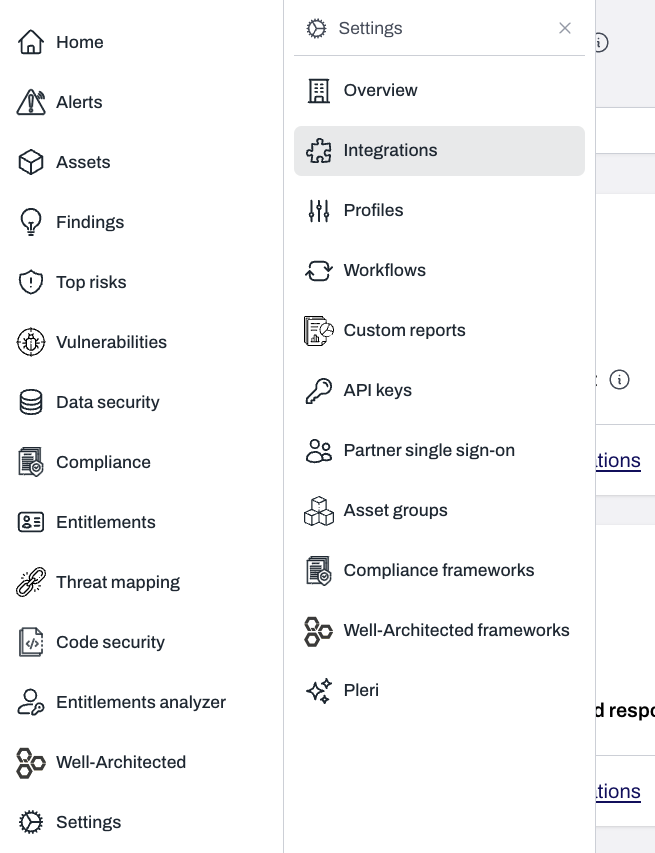
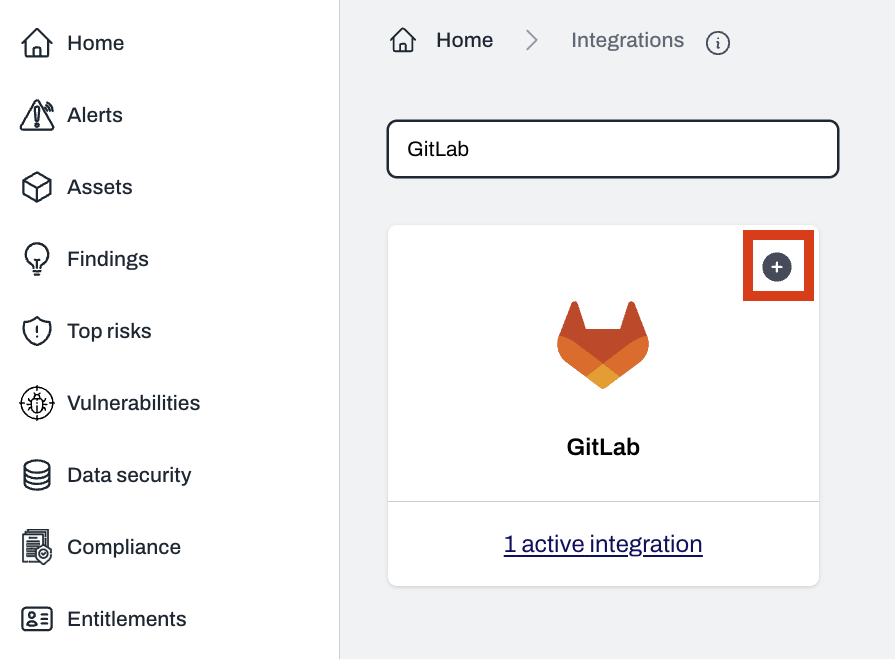
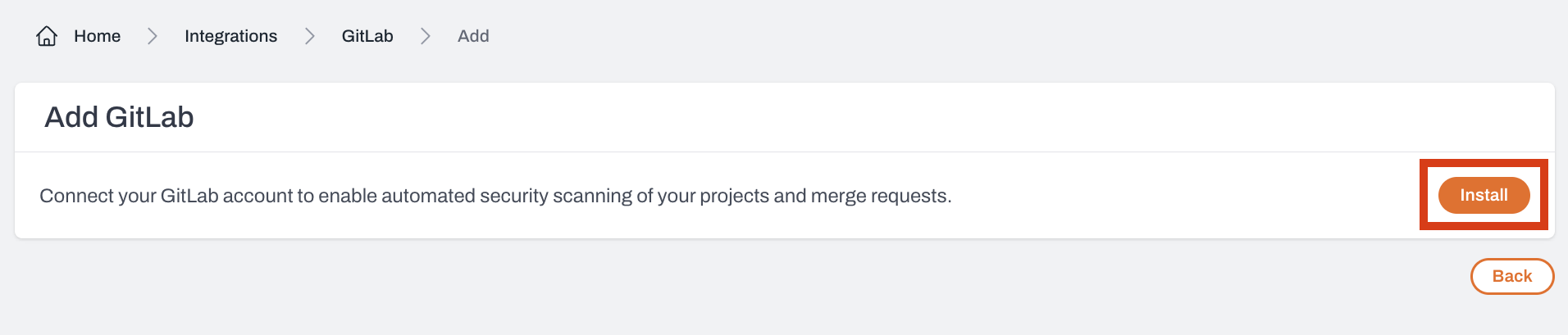
## Steps to integrate GitLab with Plerion
 ## Configuring your GitLab integration
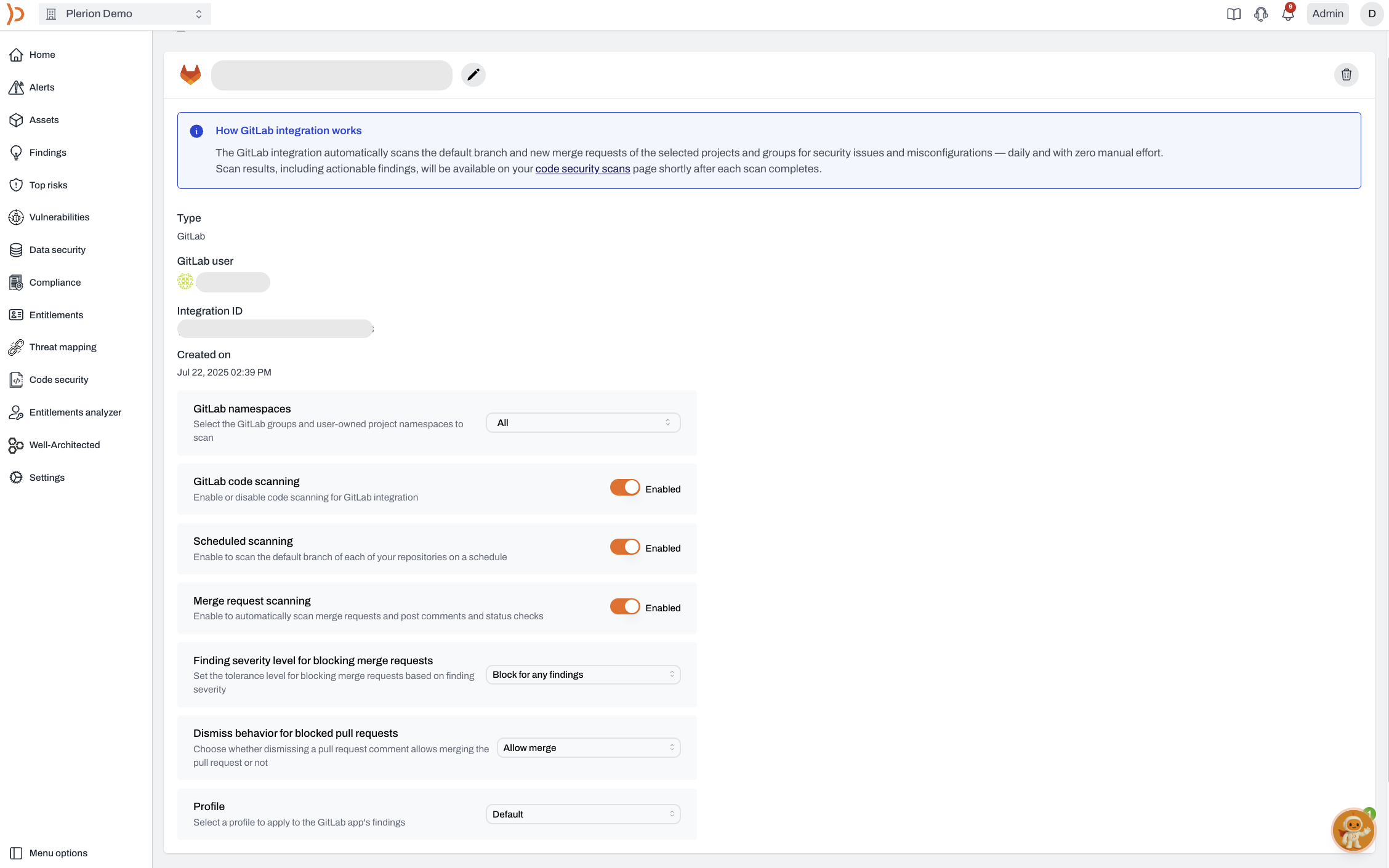
Once installed, you can configure the GitLab integration to match your workflows. These settings control which namespaces are scanned, when and how scans run, how issues are handled, and what rules apply.
### Integration status
Controls whether Plerion Code Security is active.
* **Default**: Enabled
* **When disabled**: Pauses all scanning activities, including scheduled and merge request scans
* **Recommendation**: Keep enabled unless there is a specific need to pause
## Configuring your GitLab integration
Once installed, you can configure the GitLab integration to match your workflows. These settings control which namespaces are scanned, when and how scans run, how issues are handled, and what rules apply.
### Integration status
Controls whether Plerion Code Security is active.
* **Default**: Enabled
* **When disabled**: Pauses all scanning activities, including scheduled and merge request scans
* **Recommendation**: Keep enabled unless there is a specific need to pause
 ### Scheduled scans
Runs automatic daily scans of your main branches.
* **Default**: Enabled
* **Purpose**: Continuous monitoring of production-ready code
* **Key points**:
* Runs without manual input
* Identifies risks in stable branches
* Helps with long-term security posture
### Scheduled scans
Runs automatic daily scans of your main branches.
* **Default**: Enabled
* **Purpose**: Continuous monitoring of production-ready code
* **Key points**:
* Runs without manual input
* Identifies risks in stable branches
* Helps with long-term security posture
 ### Merge request scanning
Scans code in new and updated merge requests.
* **Default**: Enabled
* **What it does**:
* Scans only changes introduced in the merge request
* Posts findings as comments directly in GitLab
* Integrates with GitLab status checks to block insecure merges
* **Supported file types**: YAML, Terraform, JSON, and other IaC files
* **Why it matters**: Prevents vulnerabilities from being merged, encourages secure development practices, and builds developer awareness
### Merge request scanning
Scans code in new and updated merge requests.
* **Default**: Enabled
* **What it does**:
* Scans only changes introduced in the merge request
* Posts findings as comments directly in GitLab
* Integrates with GitLab status checks to block insecure merges
* **Supported file types**: YAML, Terraform, JSON, and other IaC files
* **Why it matters**: Prevents vulnerabilities from being merged, encourages secure development practices, and builds developer awareness
 ### Tolerance for blocking merge requests
Controls when merge requests are blocked based on severity.
* **Default**: Do not block merge requests
* **Options**:
* Only block for critical findings
* Block for high and critical findings
* Block for medium and above findings
* Block for any finding
* Do not block merge requests
* **Best use**: Choose based on your team’s security posture, development velocity, and compliance requirements
### Tolerance for blocking merge requests
Controls when merge requests are blocked based on severity.
* **Default**: Do not block merge requests
* **Options**:
* Only block for critical findings
* Block for high and critical findings
* Block for medium and above findings
* Block for any finding
* Do not block merge requests
* **Best use**: Choose based on your team’s security posture, development velocity, and compliance requirements
 ### Profile
Defines which detection rules are used during scans.
* **Default**: Organization’s default profile
* **Options**: Use an existing profile or create a new one
* **Where to manage**: Detection Settings in Plerion
* **Best use**: Align profiles with coding standards, risk appetite, and compliance needs
### Profile
Defines which detection rules are used during scans.
* **Default**: Organization’s default profile
* **Options**: Use an existing profile or create a new one
* **Where to manage**: Detection Settings in Plerion
* **Best use**: Align profiles with coding standards, risk appetite, and compliance needs
 ## Best practices
* Keep the integration enabled for continuous coverage
* Use scheduled scans to monitor long-term branches
* Enable merge request scanning to prevent insecure code from merging
* Set merge request blocking tolerance based on your risk tolerance
* Select a detection profile that matches your organization’s security requirements
## Best practices
* Keep the integration enabled for continuous coverage
* Use scheduled scans to monitor long-term branches
* Enable merge request scanning to prevent insecure code from merging
* Set merge request blocking tolerance based on your risk tolerance
* Select a detection profile that matches your organization’s security requirements