> ## Documentation Index
> Fetch the complete documentation index at: https://docs.plerion.com/llms.txt
> Use this file to discover all available pages before exploring further.
# Azure troubleshooting
> Troubleshoot errors in Azure subscription onboarding, workload security (CWPP) setup, and appliance lifecycle in Plerion.
With the **Azure integration**, you can onboard subscriptions for **Cloud Security Posture Management (CSPM)** and enable **workload security**—also known as **Cloud Workload Protection Platform (CWPP)**—to scan workloads for vulnerabilities. This guide explains how to resolve common errors you may encounter.
***
## Onboarding errors
The following errors may occur while onboarding Azure subscriptions using the automated CLI option.
### (AuthorizationFailed) The client ' ' with object id ' ' does not have authorization to perform action 'Microsoft.Authorization/roleAssignments/write'
 **Cause:** The user does not have sufficient permissions to assign required roles to the managed identity.
**Solution:** Grant the user permissions to assign roles. Plerion recommends assigning the **Owner** role in the subscription for smoother onboarding. See [Assign Azure Roles via the Azure Portal](https://docs.microsoft.com/en-us/azure/role-based-access-control/role-assignments-portal).
***
### (AuthorizationFailed) The client ' ' with object id ' ' does not have authorization to perform action 'Microsoft.Resources/subscriptions/resourcegroups/write'
**Cause:** The user does not have sufficient permissions to assign required roles to the managed identity.
**Solution:** Grant the user permissions to assign roles. Plerion recommends assigning the **Owner** role in the subscription for smoother onboarding. See [Assign Azure Roles via the Azure Portal](https://docs.microsoft.com/en-us/azure/role-based-access-control/role-assignments-portal).
***
### (AuthorizationFailed) The client ' ' with object id ' ' does not have authorization to perform action 'Microsoft.Resources/subscriptions/resourcegroups/write'
 **Cause:** The user does not have permission to create the resource group required to enable CWPP.
**Solution:** Assign the user the necessary permissions to create resource groups. Granting the **Owner** role at the subscription level is recommended. See [Assign Azure Roles via the Azure Portal](https://docs.microsoft.com/en-us/azure/role-based-access-control/role-assignments-portal).
***
### (RequestDisallowedByPolicy) Resource 'plerion-cwpp-appliance-\-rg' was disallowed by policy
**Cause:** The user does not have permission to create the resource group required to enable CWPP.
**Solution:** Assign the user the necessary permissions to create resource groups. Granting the **Owner** role at the subscription level is recommended. See [Assign Azure Roles via the Azure Portal](https://docs.microsoft.com/en-us/azure/role-based-access-control/role-assignments-portal).
***
### (RequestDisallowedByPolicy) Resource 'plerion-cwpp-appliance-\-rg' was disallowed by policy
 **Cause:** A subscription policy blocks the creation of the required resource group. CWPP requires resource groups and managed identity names to exactly match the onboarding script.
**Solution:** Remove or adjust the policy, or create an exception to allow the resource group `plerion-cwpp-appliance--rg`. See [Naming Overview](https://learn.microsoft.com/en-us/azure/cloud-adoption-framework/govern/resource-consistency/naming) for Azure resource naming conventions.
***
## CWPP integration errors
The following errors may occur when enabling workload security for an Azure subscription.
### BadCWPPConfiguration: Resources required to run CWPP capabilities have not been properly configured
**Cause:** The subscription does not contain all required resources, or the user lacks permissions during onboarding.
**Solution:** Re-run CWPP onboarding. See [Steps to add a Microsoft Azure subscription integration](/guides/integrations/azure/setting-up-azure-subscription#steps-to-add-a-microsoft-azure-subscription-integration).
***
### ProviderNotAvailable: Provider needed to run CWPP scan has not been registered
**Cause:** The `Microsoft.Compute` provider is not registered for the subscription.
**Solution:** Register the provider:
* [Register resource provider](https://learn.microsoft.com/en-us/azure/azure-resource-manager/management/resource-providers-and-types#register-resource-provider-1)
* Or run:
```bash theme={"system"}
az provider register --namespace Microsoft.Compute --subscription
```
***
### AccessDenied: Plerion does not have access to the subscription
**Cause:** **Cause:** This error occurs when Plerion does not have the required permissions to access the subscription.
**Solution:**
1. Verify that the Plerion platform has the necessary subscription permissions.
2. Re-run CWPP onboarding. See [Steps to add a Microsoft Azure subscription integration](/guides/integrations/azure/setting-up-azure-subscription#steps-to-add-a-microsoft-azure-subscription-integration).
***
## Appliance lifecycle errors
The following errors may arise during CWPP appliance operation.
### OperationNotAllowed: Exceeding approved standardDSv3Family Cores quota
**Cause:** A subscription policy blocks the creation of the required resource group. CWPP requires resource groups and managed identity names to exactly match the onboarding script.
**Solution:** Remove or adjust the policy, or create an exception to allow the resource group `plerion-cwpp-appliance--rg`. See [Naming Overview](https://learn.microsoft.com/en-us/azure/cloud-adoption-framework/govern/resource-consistency/naming) for Azure resource naming conventions.
***
## CWPP integration errors
The following errors may occur when enabling workload security for an Azure subscription.
### BadCWPPConfiguration: Resources required to run CWPP capabilities have not been properly configured
**Cause:** The subscription does not contain all required resources, or the user lacks permissions during onboarding.
**Solution:** Re-run CWPP onboarding. See [Steps to add a Microsoft Azure subscription integration](/guides/integrations/azure/setting-up-azure-subscription#steps-to-add-a-microsoft-azure-subscription-integration).
***
### ProviderNotAvailable: Provider needed to run CWPP scan has not been registered
**Cause:** The `Microsoft.Compute` provider is not registered for the subscription.
**Solution:** Register the provider:
* [Register resource provider](https://learn.microsoft.com/en-us/azure/azure-resource-manager/management/resource-providers-and-types#register-resource-provider-1)
* Or run:
```bash theme={"system"}
az provider register --namespace Microsoft.Compute --subscription
```
***
### AccessDenied: Plerion does not have access to the subscription
**Cause:** **Cause:** This error occurs when Plerion does not have the required permissions to access the subscription.
**Solution:**
1. Verify that the Plerion platform has the necessary subscription permissions.
2. Re-run CWPP onboarding. See [Steps to add a Microsoft Azure subscription integration](/guides/integrations/azure/setting-up-azure-subscription#steps-to-add-a-microsoft-azure-subscription-integration).
***
## Appliance lifecycle errors
The following errors may arise during CWPP appliance operation.
### OperationNotAllowed: Exceeding approved standardDSv3Family Cores quota
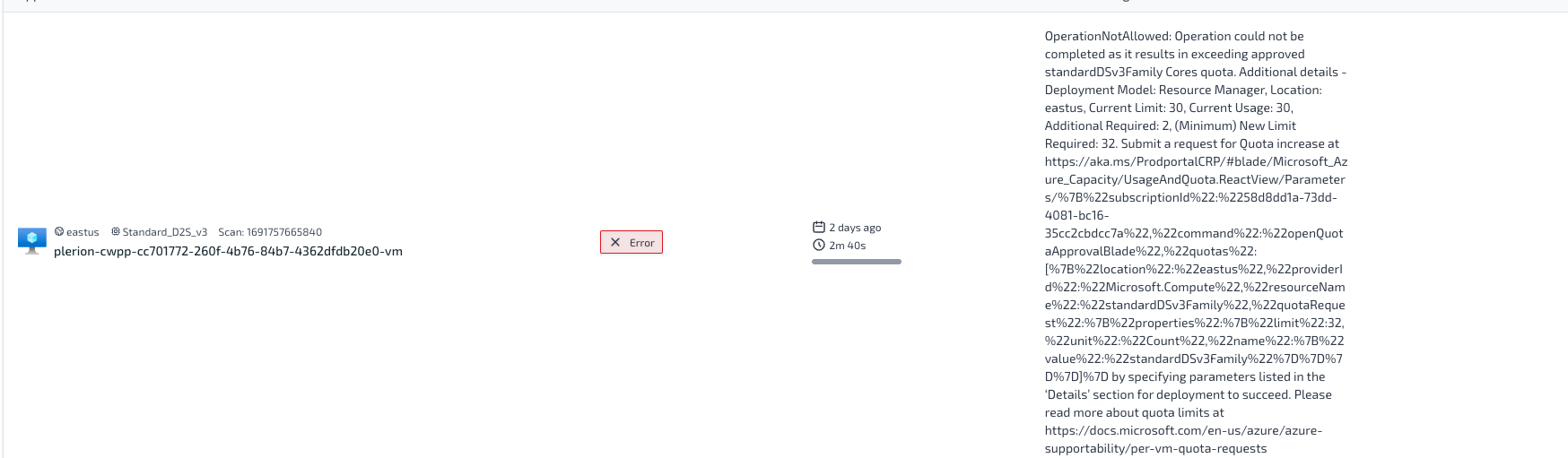 **Cause:** Insufficient quota for `standardDSv3Family` cores in the selected region.
**Solution:** Increase the quota for that VM family in the region. See [Increase quota for regional cores](/guides/integrations/azure/prerequisites#increase-quota-for-regional-cores).
***
### PublicIPCountLimitReached: Cannot create more than x public IP addresses in this region
**Cause:** Insufficient quota for `standardDSv3Family` cores in the selected region.
**Solution:** Increase the quota for that VM family in the region. See [Increase quota for regional cores](/guides/integrations/azure/prerequisites#increase-quota-for-regional-cores).
***
### PublicIPCountLimitReached: Cannot create more than x public IP addresses in this region
 **Cause:** Insufficient quota for public IP addresses in the selected region.
**Solution:** Increase the quota for public IPs in that region. See [Increase quota for regional public IP addresses](/guides/integrations/azure/prerequisites#increase-quota-for-regional-public-ip-addresses).
***
### ResourceNotFound: Appliance virtual machine not found
**Cause:** Insufficient quota for public IP addresses in the selected region.
**Solution:** Increase the quota for public IPs in that region. See [Increase quota for regional public IP addresses](/guides/integrations/azure/prerequisites#increase-quota-for-regional-public-ip-addresses).
***
### ResourceNotFound: Appliance virtual machine not found
 **Cause:** The appliance VM was deleted from the subscription.
**Solution:** Do not delete CWPP appliances. Removing them will cause scans to fail.
***
### ApplianceTimeout: Appliance timed out
**Cause:** The appliance VM was deleted from the subscription.
**Solution:** Do not delete CWPP appliances. Removing them will cause scans to fail.
***
### ApplianceTimeout: Appliance timed out
 **Cause:** Workload scans exceeding 3 hours cause the appliance to timeout.
**Solution:** Contact Plerion Support if this error persists. Support can extend the timeout limit if required.
***
### InternalError: Appliance failed with unknown error
**Cause:** Workload scans exceeding 3 hours cause the appliance to timeout.
**Solution:** Contact Plerion Support if this error persists. Support can extend the timeout limit if required.
***
### InternalError: Appliance failed with unknown error
 **Cause:** Internal error in the appliance.
**Solution:** The appliance usually recovers automatically in the next scan. Contact Plerion Support if the issue persists.
**Cause:** Internal error in the appliance.
**Solution:** The appliance usually recovers automatically in the next scan. Contact Plerion Support if the issue persists.