> ## Documentation Index
> Fetch the complete documentation index at: https://docs.plerion.com/llms.txt
> Use this file to discover all available pages before exploring further.
# Azure CWPP architecture
> This document outlines the architecture and Azure deployment process of the Plerion workload security solution.
Plerion's workload security (Cloud Workload Protection Platform, or CWPP) capability allows you to protect your Azure workloads from threats, by leveraging enriched and contextualized data from vulnerabilities, inked exploits, sensitive data exposure, and Software Bill of Materials (SBOM).
***
## Agentless solution
Plerion’s workload security solution is fully agentless, eliminating the need to install software on Azure workloads. Instead, Plerion deploys ephemeral scanning appliances within your Azure subscription. These appliances automatically assess workloads and provide comprehensive visibility into their security posture.
Each appliance is a short-lived Azure Virtual Machine (VM) deployed in a dedicated, Plerion-managed resource group. Appliances run in the same Azure region as the workloads being scanned to ensure efficiency, data locality, and compliance with regional requirements.
***
## Onboarding process
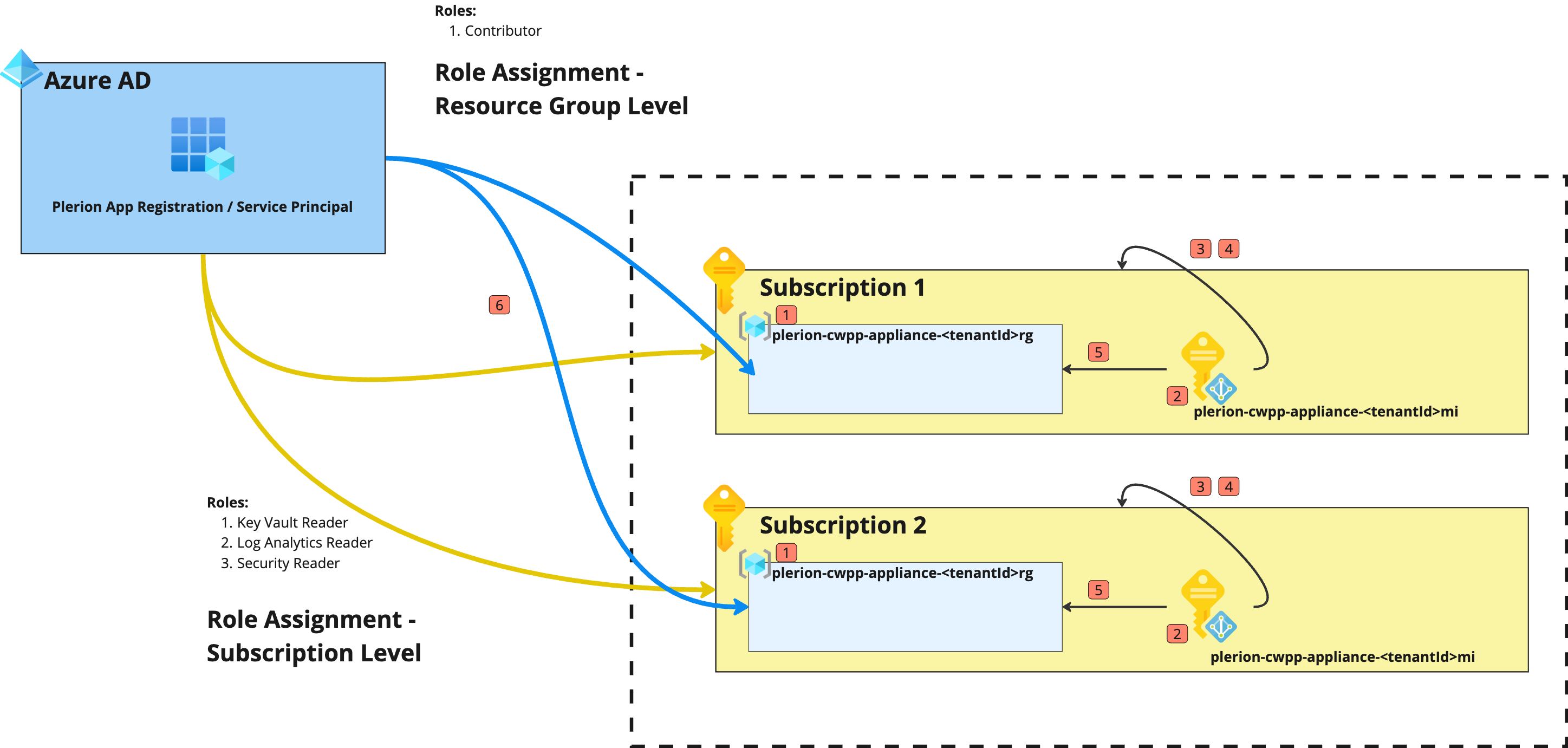 Before onboarding CWPP for an Azure subscription, make sure a Microsoft Entra ID integration is already configured in Plerion. CWPP uses the same App Registration created during that integration.
For setup instructions, see [Getting started with Microsoft Entra ID](/guides/integrations/azure/setting-up-azure-active-directory).
### Steps to onboard an Azure subscription
| Resource Type | Resource Name | Description |
| -------------- | --------------------------------------------- | ---------------------------------------------------------- |
| Resource Group | `plerion-cwpp-appliance--rg` | Dedicated resource group for launching Plerion appliances. |
`` is the tenant ID of your Plerion tenant, available on the Plerion platform.
| Resource Type | Resource Name | Description |
| --------------------- | --------------------------------------------- | --------------------------------------------------------------- |
| User Managed Identity | `plerion-cwpp-appliance--mi` | Managed identity attached to appliances for scanning workloads. |
| Identity | Role Name | Scope | Description |
| --------------------------------------------- | ------------------------- | -------------------------------------------------------------- | -------------------------------------------------------------------------------------------------------------------------------------- |
| `plerion-cwpp-appliance--mi` | Reader | Azure Subscription | Read-only access to all resources in the subscription. |
| `plerion-cwpp-appliance--mi` | Disk Snapshot Contributor | Azure Subscription | Create, manage, and copy disk snapshots to the resource group for scanning. |
| `plerion-cwpp-appliance--mi` | Contributor | Resource Group (`plerion-cwpp-appliance--rg`) | Full access to all resources in the appliance resource group. |
| Plerion App Registration (Service Principal) | Contributor | Resource Group (`plerion-cwpp-appliance--rg`) | Full access to manage appliance resources, networks, and perform cleanup operations. Used by the Plerion Control Plane to manage CWPP. |
After completing these steps, the **Plerion Protection Platform** has the necessary permissions to deploy appliances within the resource group and scan workloads in the Azure subscription.
Repeat this process for **each Azure subscription** that you wish to onboard to Plerion.
***
## Plerion control plane
Before onboarding CWPP for an Azure subscription, make sure a Microsoft Entra ID integration is already configured in Plerion. CWPP uses the same App Registration created during that integration.
For setup instructions, see [Getting started with Microsoft Entra ID](/guides/integrations/azure/setting-up-azure-active-directory).
### Steps to onboard an Azure subscription
| Resource Type | Resource Name | Description |
| -------------- | --------------------------------------------- | ---------------------------------------------------------- |
| Resource Group | `plerion-cwpp-appliance--rg` | Dedicated resource group for launching Plerion appliances. |
`` is the tenant ID of your Plerion tenant, available on the Plerion platform.
| Resource Type | Resource Name | Description |
| --------------------- | --------------------------------------------- | --------------------------------------------------------------- |
| User Managed Identity | `plerion-cwpp-appliance--mi` | Managed identity attached to appliances for scanning workloads. |
| Identity | Role Name | Scope | Description |
| --------------------------------------------- | ------------------------- | -------------------------------------------------------------- | -------------------------------------------------------------------------------------------------------------------------------------- |
| `plerion-cwpp-appliance--mi` | Reader | Azure Subscription | Read-only access to all resources in the subscription. |
| `plerion-cwpp-appliance--mi` | Disk Snapshot Contributor | Azure Subscription | Create, manage, and copy disk snapshots to the resource group for scanning. |
| `plerion-cwpp-appliance--mi` | Contributor | Resource Group (`plerion-cwpp-appliance--rg`) | Full access to all resources in the appliance resource group. |
| Plerion App Registration (Service Principal) | Contributor | Resource Group (`plerion-cwpp-appliance--rg`) | Full access to manage appliance resources, networks, and perform cleanup operations. Used by the Plerion Control Plane to manage CWPP. |
After completing these steps, the **Plerion Protection Platform** has the necessary permissions to deploy appliances within the resource group and scan workloads in the Azure subscription.
Repeat this process for **each Azure subscription** that you wish to onboard to Plerion.
***
## Plerion control plane
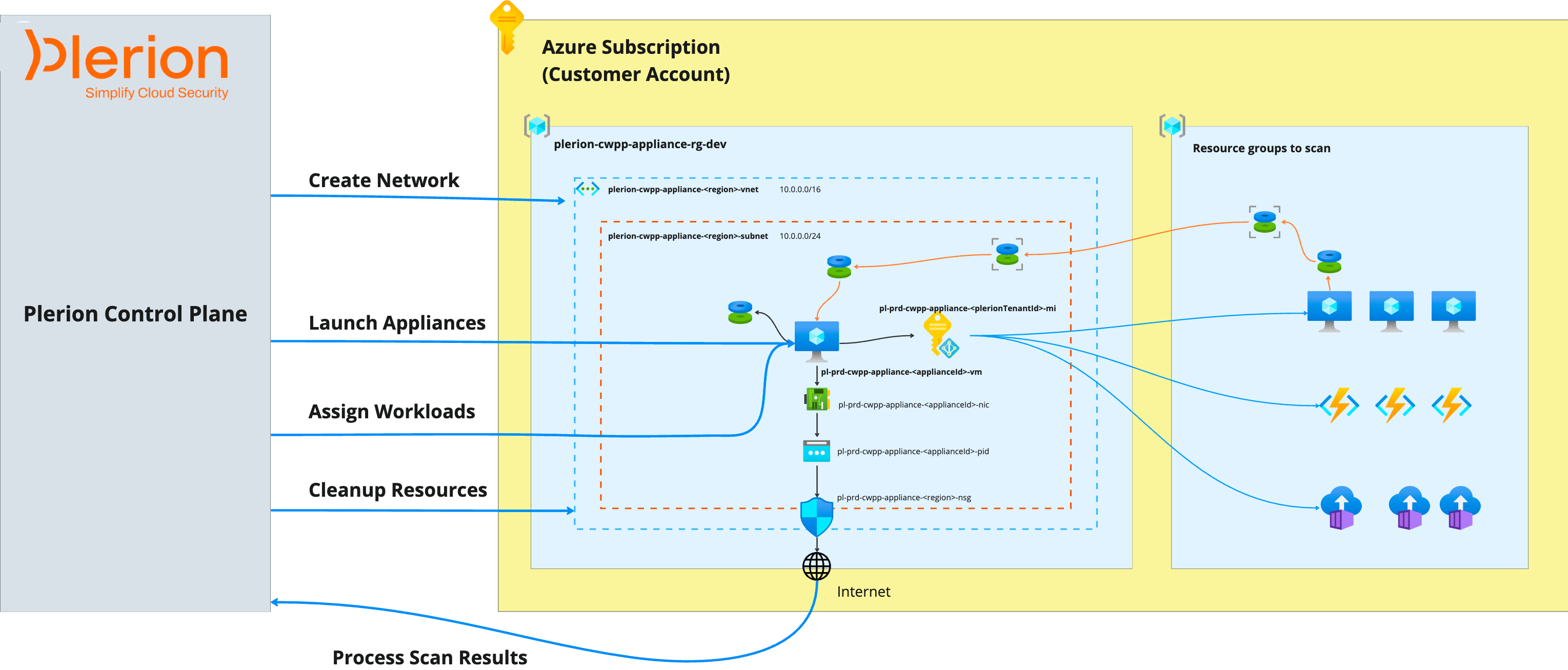 The **Plerion Control Plane** manages appliances and orchestrates workload scanning within the Azure subscription. Hosted in the Plerion platform, it performs the following functions:
* Creates virtual networks in Azure for appliance communication
* Launches appliances in the subscription
* Assigns workloads to appliances for scanning
* Manages appliance lifecycle operations
* Collects and processes scan results
Plerion repeats the following process in every region where workload security is enabled.
The Plerion Control Plane creates a **virtual network (VNet)** in the Azure subscription for appliances to securely communicate with the Plerion platform.
**Virtual network configuration**
| Specification | Details |
| ----------------- | ----------------------------------------------- |
| **Name** | `plerion-cwpp-appliance--vnet` |
| **Address space** | `10.0.0.0/16` |
**Subnet configuration**
| Specification | Details |
| ----------------- | ------------------------------------------------- |
| **Name** | `plerion-cwpp-appliance--subnet` |
| **Address space** | `10.0.0.0/24` |
**Network security group configuration**
| Specification | Details |
| -------------------- | ---------------------------------------------------------------------------------------------- |
| **Name** | `plerion-cwpp-appliance--nsg` |
| **Inbound traffic** | Block all inbound traffic |
| **Outbound traffic** | Allow outbound HTTPS (port 443) to the Plerion platform and to download appliance dependencies |
Custom network configurations are not currently supported. Support for custom networks will be added in future releases.
The Control Plane launches appliances in the dedicated resource group created during onboarding.
Appliances are deployed in the same region as the workloads being scanned, using the following configuration:
| Specification | Details |
| -------------------- | ----------------------------------------------------------------------------------------------------------------- |
| **Instance type** | Standard D2s v3 |
| **CPU** | 2 vCPUs |
| **Memory** | 8 GiB |
| **Storage** | 30 GiB |
| **Operating system** | Linux (Ubuntu 22.04) |
| **Networking** | Public IP address for secure communication with the Plerion platform (aligned with Azure security best practices) |
The following workloads are currently supported for scanning Azure Virtual Machines.
Plerion deploys appliances at a ratio of **1 appliance per 2 Azure Virtual Machines**. For each region, up to **10 appliances** can be launched concurrently, depending on the number of workloads to be scanned.
The Plerion Control Plane manages the full lifecycle of appliances, including:
* Starting appliances
* Deleting appliances
An appliance is stopped once it completes scanning all assigned workloads and is deleted immediately afterward.
If an appliance fails to stop within **3 hours**, it is automatically deleted and any unscanned workloads are marked as **Not Scanned**.
If deletion fails, the Control Plane retries the cleanup during the next integration scan and notifies the user in the Plerion platform.
After completing the scan, appliances send their results to the Plerion Control Plane.
The Control Plane stores and processes these results in the Plerion platform, making them available for review.
Plerion Workload Scanner collects only **security-related metadata** from workloads. When combined with telemetry from **CSPM** and **CIEM** capabilities, this data provides rich context to help prioritize and remediate security issues.
The Plerion Workload Scanner does **not** collect raw data, PII/PHI, or sensitive business information.
***
## Monitoring resources created by Plerion
All resources required for CWPP are deployed within the dedicated resource group (`plerion-cwpp-appliance--rg`) created during onboarding.\
Resources are prefixed with `plerion-cwpp-*` and tagged with `Owner=Plerion`.
**Benefits of a dedicated resource group**:
* Simplifies monitoring and identification of Plerion-created resources
* Enables easy cleanup of Plerion resources
* Provides clear visibility into resource costs and supports budget tracking
The **Plerion Control Plane** manages appliances and orchestrates workload scanning within the Azure subscription. Hosted in the Plerion platform, it performs the following functions:
* Creates virtual networks in Azure for appliance communication
* Launches appliances in the subscription
* Assigns workloads to appliances for scanning
* Manages appliance lifecycle operations
* Collects and processes scan results
Plerion repeats the following process in every region where workload security is enabled.
The Plerion Control Plane creates a **virtual network (VNet)** in the Azure subscription for appliances to securely communicate with the Plerion platform.
**Virtual network configuration**
| Specification | Details |
| ----------------- | ----------------------------------------------- |
| **Name** | `plerion-cwpp-appliance--vnet` |
| **Address space** | `10.0.0.0/16` |
**Subnet configuration**
| Specification | Details |
| ----------------- | ------------------------------------------------- |
| **Name** | `plerion-cwpp-appliance--subnet` |
| **Address space** | `10.0.0.0/24` |
**Network security group configuration**
| Specification | Details |
| -------------------- | ---------------------------------------------------------------------------------------------- |
| **Name** | `plerion-cwpp-appliance--nsg` |
| **Inbound traffic** | Block all inbound traffic |
| **Outbound traffic** | Allow outbound HTTPS (port 443) to the Plerion platform and to download appliance dependencies |
Custom network configurations are not currently supported. Support for custom networks will be added in future releases.
The Control Plane launches appliances in the dedicated resource group created during onboarding.
Appliances are deployed in the same region as the workloads being scanned, using the following configuration:
| Specification | Details |
| -------------------- | ----------------------------------------------------------------------------------------------------------------- |
| **Instance type** | Standard D2s v3 |
| **CPU** | 2 vCPUs |
| **Memory** | 8 GiB |
| **Storage** | 30 GiB |
| **Operating system** | Linux (Ubuntu 22.04) |
| **Networking** | Public IP address for secure communication with the Plerion platform (aligned with Azure security best practices) |
The following workloads are currently supported for scanning Azure Virtual Machines.
Plerion deploys appliances at a ratio of **1 appliance per 2 Azure Virtual Machines**. For each region, up to **10 appliances** can be launched concurrently, depending on the number of workloads to be scanned.
The Plerion Control Plane manages the full lifecycle of appliances, including:
* Starting appliances
* Deleting appliances
An appliance is stopped once it completes scanning all assigned workloads and is deleted immediately afterward.
If an appliance fails to stop within **3 hours**, it is automatically deleted and any unscanned workloads are marked as **Not Scanned**.
If deletion fails, the Control Plane retries the cleanup during the next integration scan and notifies the user in the Plerion platform.
After completing the scan, appliances send their results to the Plerion Control Plane.
The Control Plane stores and processes these results in the Plerion platform, making them available for review.
Plerion Workload Scanner collects only **security-related metadata** from workloads. When combined with telemetry from **CSPM** and **CIEM** capabilities, this data provides rich context to help prioritize and remediate security issues.
The Plerion Workload Scanner does **not** collect raw data, PII/PHI, or sensitive business information.
***
## Monitoring resources created by Plerion
All resources required for CWPP are deployed within the dedicated resource group (`plerion-cwpp-appliance--rg`) created during onboarding.\
Resources are prefixed with `plerion-cwpp-*` and tagged with `Owner=Plerion`.
**Benefits of a dedicated resource group**:
* Simplifies monitoring and identification of Plerion-created resources
* Enables easy cleanup of Plerion resources
* Provides clear visibility into resource costs and supports budget tracking